

Nether Portal Linking Explained: Fix Wrong Destinations Permanently is a complete guide for players who keep ending up at the wrong place after using Nether portals in Minecraft. If your portal sends you somewhere unexpected, links to an old base, or creates a completely new exit, this usually happens because of how Minecraft handles portal linking rules, coordinate conversion, and nearby portal detection.
In this article, you will learn how Nether portal linking actually works, why portals sometimes connect incorrectly, how search radius and closest portal selection affect your travel, and what causes destination issues in both single-player and multiplayer worlds. By the end, you will also understand how to fix broken portal links and prevent wrong portal problems using correct placement strategies.
What is Nether Portal Linking in Minecraft?
Nether portal linking is the system behind how Minecraft connects portals between the Overworld and the Nether dimension. This system controls where you arrive when you step through a portal and how linked Nether portals behave across different coordinates.
In simple terms, Minecraft portal linking decides whether your portal connects to an existing one or creates a new path. Many players face wrong Nether portal behavior where the game sends them to an unexpected location instead of their intended base or structure.
You can also use a tool like the Nether Portal Calculator to quickly understand correct placement and avoid portal destination issues before building.
Minecraft portal linking also plays a major role in dimension travel, fast travel system, and overall travel network design in survival worlds and multiplayer servers.
Basic Concept of Portal Linking System
The portal linking system is based on coordinate matching rather than memory or ownership. Minecraft only checks positions, not which portal belongs to you. This is why a portal linking error happens when two portals are too close.
The system connects portals between Minecraft dimensions, especially the Overworld dimension and the Nether dimension, using coordinate conversion rules.
Why Nether Portal Linking is Important in Gameplay?
Without proper Nether portal connection, players face broken travel routes, duplicated portals, and unpredictable movement across worlds.
Key gameplay effects include:
- Fast travel efficiency drops in survival world portals
- Multiplayer server portals become confusing
- Neither hub system loses accuracy
- portal transportation system breaks down
Overworld and Nether Connection Explained
The game connects overworld coordinates and Nether coordinates using a fixed scaling system. This creates the base for all coordinate conversion and coordinate scaling behavior.
How does Nether Portal Linking work? (Complete Mechanism)
Minecraft’s Nether portal system is not random at all. It follows a fixed coordinate-based logic that decides exactly where you end up when you travel between the Overworld and the Nether. Most portal not-linking problems happen because players don’t understand how coordinates are converted, how portals are scanned, and how the game picks the final destination. Once you understand this mechanism, most portal destination issues start making sense.
Coordinate Conversion Rule (Overworld to Nether Ratio 8:1)
Minecraft uses a strict rule where overworld to nether coordinates are divided by 8, and nether to overworld coordinates are multiplied by 8.
This system defines all portal coordinates, portal alignment, and portal synchronization behavior.
Example:
- Overworld X: 800 → Nether X: 100
- Overworld Z: 400 → Nether Z: 50
This conversion is the foundation of the Nether portal linking and portal routing issue prevention.
How Minecraft Calculates Portal Positions
When a player enters a portal, Minecraft:
- Reads current position
- Applies coordinate conversion
- Checks nearby portals
- Matches the closest valid portal
This process directly affects the portal not linking correctly to cases and incorrect portal connection problems.
Portal Target Selection Process Step by Step
Minecraft follows a fixed logic:
- Convert coordinates
- Scan for nearby portals
- Apply the closest portal selection
- Use the nearest portal rule
- If none are found, generate a new portal
This system controls all portal sends me to the wrong place in cases when another portal is closer than the intended one.
Why Linking is Not Random but System-Based
Many players think Minecraft portal bug behavior is random, but it is fully based on rules. Every portal mismatch happens due to distance logic, not randomness.
Minecraft Portal Destination System Explained
Minecraft’s portal destination system decides exactly where a player will arrive after using a Nether portal. This system is fully based on position logic and distance checks, which means your destination is never random. Most portal goes to wrong location issues happen when players do not realize how the game evaluates nearby portals before finalizing the teleport point.
How the Game Chooses a Destination Portal
Minecraft checks all portals inside a search area and selects the closest one based on distance. This is why the portal often goes to the wrong location, even if your original portal is correct.
Role of “Closest Portal Rule” in Linking
The nearest portal rule means Minecraft always prioritizes proximity. Eveblocks ‘ locks and differences can completely change your portal destination issue outcome.
Distance Calculation in Portal Selection
The distance between portals decides everything. If two portals exist:
- One is 20 blocks away
- One is 25 blocks away
The system always chooses the closer one, creating broken portal links in tightly built areas.
Why Players Think It is a Minecraft Portal Bug
When multiple Nether portals exist nearby, players see inconsistent teleport behavior. This creates confusion, but it is caused by overlapping portals and the portal overlap problem, not a bug.
Why is your Nether Portal linked to the Wrong Place?
Many players think Nether portal problems are random, but in reality, Nether portal linking follows strict coordinate rules and distance-based selection. When something feels off, it usually comes from placement mistakes, nearby portals, or a misunderstanding of how portal mechanics actually work in Minecraft.
Incorrect Coordinate Placement of Portal
If portal placement rules are ignored, the portal will not match the expected coordinates. This creates a portal not link correctly.
Existing Nearby Portal Override Issue
If another portal is closer in range, Minecraft overrides your intended destination, causing linked Nether portals to connect incorrectly.
Portal Not Linking Correctly Due to Distance Conflict
Even small differences in coordinates can trigger a portal linking error, especially in large survival worlds.
Overlapping Portal Zones Causing Wrong Nether Portal
When portals are too close, a portal overlap problem happens, causing unstable linking behavior.
Player Misunderstanding of Portal Mechanics
Most players expect manual pairing, but portal mechanics depend only on coordinate logic and proximity.
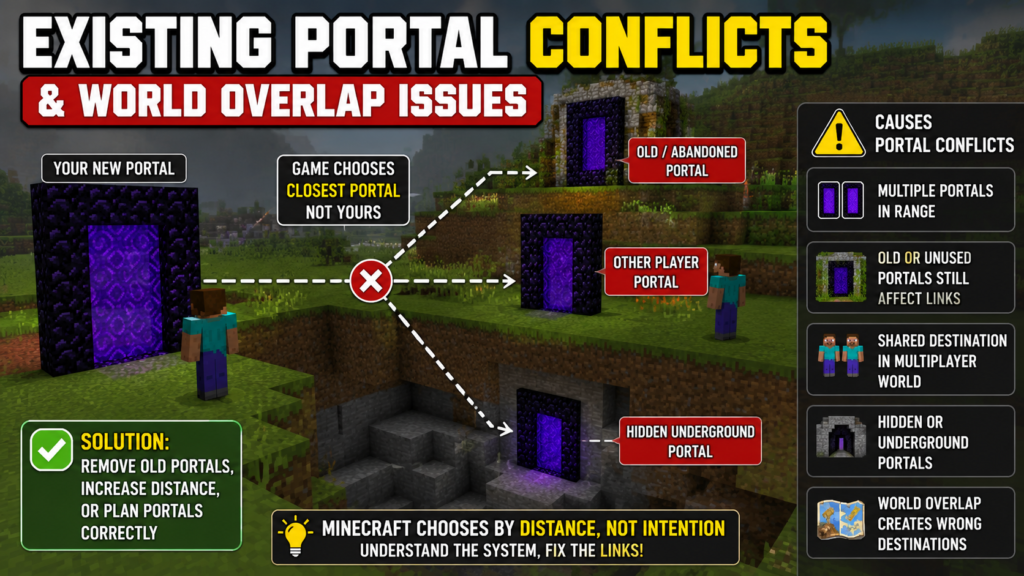
Existing Portal Conflicts and World Overlap Issues
In Minecraft, many portal linking error problems come from existing structures already placed in the world. The game does not treat portals as “owned” or “assigned” to a player. Instead, it constantly checks every available portal inside the search area, which creates existing portal conflicts when multiple portals are close together. This is one of the main reasons behind Nether portal linking issues in both single-player and multiplayer worlds.
How Multiple Portals Interfere with Portal Linking
When multiple Nether portals exist in one area, Minecraft scans all of them and chooses based on distance, not intention.
Old or Abandoned Portals Still Affecting New Links
Even unused portals contribute to existing portal conflicts, causing unpredictable results in survival world portals.
Shared Destination Problem in Multiplayer Worlds
In multiplayer server portals, many players build near each other, increasing duplicate portals and routing confusion.
Hidden Underground Portals Causing Conflicts
Hidden or forgotten portals increase portal routing issue cases because the system still detects them.
Nether Portal Search Radius Explained
The Nether portal search radius is one of the most important parts of Nether portal linking, but it is also the main reason players often experience portals not linking correctly or unexpected travel behavior. Minecraft does not randomly choose destinations; instead, it scans a specific area in the target dimension and decides based on what portals already exist inside that range.
How Far Minecraft Searches for Portal Connections
Minecraft uses a defined Nether portal search radius, typically around 128 blocks in the target dimension, to find valid portals.
Why Search Radius Causes Wrong Portal Linking
If any portal exists inside this radius, Minecraft will use it, even if it was not intended. This leads to portal linking errors, and the portal sends me to the wrong place.
What Happens When No Portal is Found in Range
If no portal exists inside range, Minecraft creates a new one automatically, which may trigger portal generation rules in unexpected locations.
Impact of Slight Coordinate Shifts on Destination
Small movement changes can shift search results completely, causing portal destination issue behavior.
Closest Portal Selection Rule
The closest portal selection rule is one of the core systems behind Nether portal linking in Minecraft. It decides which portal a player will be sent to after using a Nether portal. Instead of remembering which portal you built, the game simply checks distance and chooses the nearest valid option. This is why many portal destination issues appear in crowded or well-developed worlds.
Why Minecraft Always Picks the Nearest Portal
Minecraft prioritizes efficiency in the fast travel system, so it always selects the closest portal available.
How “Closest Distance Rule” Overrides Player Intent
Even if a player builds a planned portal, the closest portal selection overrides it if another portal is nearer.
Real Examples of Wrong Portal Selection
If:
- Intended portal = 120 blocks away
- Existing portal = 80 blocks away
Minecraft selects the 80-block portal, causing portal goes to wrong location.
How Small Distance Differences Change Outcomes
Even 5–10-block differences can change routing completely in Nether dimension calculations.
Portal Generation Rules in Minecraft
The portal generation rules in Minecraft control what happens when the game cannot find any existing portal near the target coordinates. Instead of leaving the player without a destination, the system automatically creates a new portal based on available space and safety checks. This is a key part of Nether portal linking because it ensures travel always works, even when no prior structure exists.
When Minecraft Creates a New Portal Automatically
If no valid portal exists in range, Minecraft generates a new one based on portal generation rules.
Where New Portals Spawn in the Nether and the Overworld
New portals appear in safe locations, avoiding lava, water, and unstable terrain.
Why Portals Sometimes Appear in Wrong Locations
This happens due to terrain limitations inside Minecraft dimensions, forcing relocation of portal placement.
Terrain Influence on Portal Placement
Caves, cliffs, and water bodies directly affect portal coordinates and final placement results.
How to Fix Wrong Nether Portal Linking?
Fixing Nether portal linking problems requires a careful, step-by-step approach because most issues come from incorrect coordinates, nearby portals, or overlapping structures. Instead of randomly rebuilding portals, the goal is to correct portal placement rules, eliminate conflicts, and align everything with Minecraft’s linking system so the portal destination issue does not repeat.
Step 1: Find Correct Converted Coordinates
Use coordinate scaling rules or a Minecraft Nether portal calculator to get accurate positions.
Step 2: Identify and Remove Conflicting Portals
Remove nearby portals causing existing portal conflicts and duplicate portals.
Step 3: Rebuild Portal at Exact Location
Follow correct portal alignment based on calculated coordinates.
Step 4: Re-Test Bidirectional Linking
Test both directions:
- Overworld to Nether
- Nether to Overworld
Step 5: Verify No Nearby Portal Conflicts Exist
Make sure no other portals exist within the search radius to avoid portal mismatch issues.
Advanced Fix for Portal Not Linking Correctly
When basic fixes don’t solve the portal not linking correctly, the issue usually comes from deeper coordination problems, overlapping builds, or uncontrolled portal placement. At this stage, Minecraft’s Nether portal linking system needs a more structured approach where everything is planned using exact coordinates and clean routing logic.
Aligning Portals Manually Using Coordinates
Manual alignment is one of the most reliable ways to fix persistent portal linking error problems in survival worlds. Instead of guessing placement, you work directly with portal coordinates using accurate coordinate conversion between the Overworld and the Nether.
When portals are aligned manually:
- Each portal matches the exact Nether coordinates
- No random offset affects travel
- Portal synchronization becomes stable
This method removes most cases of incorrect portal connection because the system no longer has room for ambiguity. Even in large builds, precise placement reduces portal mismatch issues significantly.
Creating a Controlled Nether Hub System
A Nether hub is a structured travel system that organizes all portals into one central routing area. Instead of scattered portals, everything connects through a controlled network inside the Nether.
This setup helps:
- Reduce the confusion from multiple Nether portals on
- Avoid overlapping portals in shared regions
- Improve consistency in the fast travel system
In a proper hub design, each portal is spaced intentionally so Minecraft’s closest portal selection rule always produces predictable results. This prevents random portal destination issue behavior and keeps long-distance travel stable.
Preventing Future Portal Destination Issues
Once your system is fixed, prevention becomes the most important step. Most portal linking error cases return because players place new portals without checking existing ones or ignoring portal placement rules.
To avoid future issues:
- Always calculate coordinate scaling before building
- Maintain proper spacing between portals
- Avoid building near old or hidden portals
- Plan routes across Minecraft dimensions before expansion
These habits help maintain a stable Nether portal connection and prevent recurring Nether portal problems in both single-player and multiplayer worlds.
Fixing Multiplayer Portal Conflicts
In multiplayer environments, multiplayer server portals often create complex routing problems because many players build in shared areas without coordination. This leads to duplicate portals, overlapping zones, and unpredictable travel results.
To fix this:
- Assign separate build zones for each player
- Coordinate portal coordinates before construction
- Avoid clustering portals within the same Nether portal search radius
Proper planning reduces the portal overlap problem and ensures each player’s travel remains independent. This is especially important in large survival communities where portal transportation system efficiency affects gameplay stability.

Common Minecraft Portal Bugs vs Real Linking Rules
Many Nether portal linking problems are misunderstood as glitches or broken game behavior. In reality, most of these issues come from how Minecraft’s portal system is designed to work. What players call a Minecraft portal bug is usually just the result of coordinate logic, distance checks, and portal mechanics working exactly as intended.
Why It Looks Like a Minecraft Portal Bug
A lot of portal not linking situations correctly feel random at first. You might step into a portal expecting one destination, but end up somewhere completely different. This often leads players to believe something is broken.
However, this happens because Minecraft is constantly checking:
- Nearby existing portals
- portal search radius results
- closest portal selection rules
When another portal is even slightly closer, the game overrides your expectation. This creates the illusion of a portal destination issue, even though the system is just following distance logic. So what looks like a bug is actually structured behavior from Minecraft portal linking rules.
Actual Game Mechanics Behind “Glitches”
All portal behavior in Minecraft is based on predictable systems. There is no randomness involved in portal routing issue outcomes.
The game uses:
- coordinate conversion between the Overworld and the Nether
- Fixed Nether portal search radius checks
- strict nearest portal rule selection
- portal generation rules when no match is found
Because of this, every incorrect portal connection can be traced back to position, distance, or existing portal conflicts. Even when portals appear to behave inconsistently, they are still following the same underlying system across all Minecraft dimensions.
Misleading Player Assumptions Explained
A common misunderstanding is that Minecraft connects portals in pairs or remembers which portal was built first. Many players assume manual linking is part of the system, but that is not how portal synchronization works.
Instead, Minecraft only cares about:
- Location of portals
- Distance between portals
- Whether a portal exists inside the search area
This leads to confusion when multiple Nether portals exist close together, because the game will always choose based on proximity rather than intention. As a result, players often experience portals sending them to the wrong place and assume it is a bug, when it is actually a predictable outcome of portal linking error rules.
Using the Nether Portal Calculator to Prevent Linking Issues
Most Nether portal linking problems come from small human mistakes during coordinate calculation or portal placement. Because Minecraft depends heavily on exact positioning, even a minor error can cause a portal destination issue or send players to the wrong location. Using tools like a Nether portal calculator helps remove guesswork and keeps portal mechanics consistent across all Minecraft dimensions.
Why Manual Calculation Causes Errors
Manual calculation often leads to mistakes because players have to divide or multiply coordinates by hand. Since coordinate conversion between the Overworld and Nether uses an exact 8:1 ratio, even a small rounding error can shift the final location.
These small mistakes can result in:
- The portal is not linking correctly
- portal mismatch
- Wrong Nether Portal
- unstable portal synchronization
In survival worlds and multiplayer servers, these errors become more noticeable because nearby existing portal conflicts can amplify the issue. A slight miscalculation can completely change which portal Minecraft selects during the closest portal selection.
How Nether Portal Calculator Improves Accuracy
A Nether portal calculator removes all manual mistakes by automatically handling coordinate scaling and conversion between the Overworld and the Nether. Instead of guessing or rounding numbers, the tool gives exact portal coordinates instantly.
This improves Minecraft portal linking by:
- Reducing human error in calculations
- Ensuring correct portal alignment
- Preventing portal routing issues in crowded areas
- Supporting stable, fast travel system setups
By using a calculator, players avoid most portal linking error cases caused by incorrect placement or misaligned portals.
You can also use the Nether Portal Coordinates guide for quick and simple dimension conversion when planning builds.
Example of Correct Coordinate Conversion
A correct example of overworld to Nether coordinates conversion looks like this:
Overworld: 1200, 300
Nether: 150, 37.5
This follows the standard 8:1 rule used in all portal mechanics. When this conversion is done correctly, Minecraft can properly match portals and avoid incorrect portal connection issues.
If the numbers are even slightly off, the system may choose a different portal, leading to the portal sending me to the wrong place or unexpected travel paths.
Best Practices for Perfect Portal Placement
To maintain a stable Nether portal connection and avoid future broken portal links, players should always follow a few simple habits before building portals.
Always verify:
- Correct coordinate conversion before placing portals
- No nearby multiple Nether portals inside the search range
- Proper portal alignment with calculated coordinates
These steps help prevent the portal overlap problem, reduce existing portal conflicts, and keep the Nether portal search radius from interfering with your intended destination.
When done correctly, your portals stay stable, predictable, and fully aligned with Minecraft’s portal linking rules, ensuring smooth travel between the Overworld dimension and the Nether dimension.
Pro Tips to Avoid Wrong Nether Portal Forever
Most Nether portal linking problems don’t happen because of bugs, but because of poor planning. Once you understand how portal mechanics work, you can completely avoid wrong nether portal issues and keep your travel system stable across all Minecraft dimensions.
Always Check Existing Nearby Portals
Before building a new portal, always scan the area for any existing ones. Minecraft does not separate portals by ownership, so even old or hidden portals can interfere with portal linking behavior.
If another portal exists inside the Nether portal search radius, the game may select it instead of your new one. This leads to the portal not linking correctly, a portal destination issue, and unexpected travel results.
Checking surroundings helps prevent:
- overlapping portals
- existing portal conflicts
- Portal routing issue
Keep Portal Distance Properly Managed
Distance is one of the most important factors in the closest portal selection. If portals are placed too close, Minecraft may pick the wrong one even if it was not intended.
Proper spacing helps avoid:
- portal overlap problem
- multiple Nether portals interfering
- Incorrect portal connection
When portals are spaced correctly, the system can clearly separate destinations and reduce portal linking error situations.
Use Consistent Coordinate Planning
Consistent planning with coordinate conversion helps keep your entire world organized. When every portal follows the same logic between overworld coordinates and nether coordinates, the system becomes predictable.
This reduces:
- portal mismatch
- broken portal links
- portal sends me to the wrong place
By planning before building, players can maintain stable Nether connections across long survival playthroughs and multiplayer servers.
Build a Structured Nether Highway System
A structured Nether hub is one of the best long-term solutions for stable travel. Instead of random portal placement, all portals connect through a central highway system in the Nether.
This setup improves:
- long-distance travel efficiency
- fast travel system stability
- reduced portal routing issue
- controlled portal transportation system
With a proper hub, Minecraft’s portal synchronization works smoothly, and players experience far fewer portal destination issues during exploration or expansion.
Frequently Asked Questions (FAQ)
Why does my Nether portal go to a different place?
Minecraft selects the closest portal inside the search radius instead of always using your intended portal. When another portal exists nearer to the converted coordinates, the game overrides your setup, causing a portal destination issue and sending you to an unexpected location.
Can two portals link to the same location?
Yes, two portals can connect to the same destination if they fall within the same coordinate range and their portal synchronization overlaps. This often happens when multiple builds are placed close together, creating shared linked Nether portals behavior.
Is the Nether portal linking random or fixed?
Nether portal linking is completely fixed. It follows strict portal mechanics, coordinate conversion rules, and distance-based selection. Every result comes from system logic, not randomness, even when it looks like a Minecraft portal bug.
How far should portals be to avoid conflict?
To prevent interference, portals should be placed outside the Nether portal search radius, which is the area Minecraft checks for existing portals. If another portal exists inside this range, it can cause a portal linking error and unwanted destination switching.
Why does breaking the portal fix the linking issue?
Breaking a portal removes it from the list of valid targets inside the search system. This clears existing portal conflicts, forces Minecraft to generate a new connection, and often fixes portal not linking problems correctly.
Why does my Nether portal keep linking to an old base?
This happens because an older portal still exists within the search radius. Minecraft always prioritizes the nearest valid portal, which can result in the portal going into the wrong location even after building a new one.
What causes a Minecraft portal bug in gameplay?
What players call a Minecraft portal bug is usually caused by overlapping portal zones, incorrect placement, or multiple portals competing in the same coordinate area. The system itself is working as designed.
Why do multiple Nether portals interfere with each other?
When multiple Nether portals exist close together, Minecraft scans all of them and picks the nearest one. This creates a portal overlap problem, especially in survival bases or multiplayer servers.
How does coordinate conversion affect portal linking?
Minecraft uses coordinate conversion (Overworld ÷ 8 = Nether) to determine where a portal should connect. If coordinates are slightly off, it leads to incorrect portal connection and portal mismatch issues.
What is the best way to prevent wrong portal linking?
The best way is to carefully manage portal placement rules, avoid overlapping builds, and use a Nether portal calculator for accurate portal coordinates. This ensures stable portal routing and prevents broken portal links in the long run.
Conclusion: Master Nether Portal Linking System
Nether portal linking works through strict coordinate rules, not randomness. Most portal linking error issues come from wrong placement, nearby portals, and misunderstanding of search radius behavior.
When you understand coordinate conversion, closest portal selection, and portal generation rules, you can fully control stable portal linking in any world.
With correct planning, tools like a Nether portal calculator, and proper spacing, you can build a reliable fast travel system across Minecraft dimensions without facing wrong Nether portal problems again.
Nether portal linking explained: fix wrong Nether portal issues, portal not linking correctly, search radius, and destination problems fast in Minecraft.
nether portal linking, portal linking, minecraft portal linking, wrong nether portal, portal not linking correctly, minecraft portal bug, portal destination issue, nether portal search radius, portal generation rules, closest portal selection