
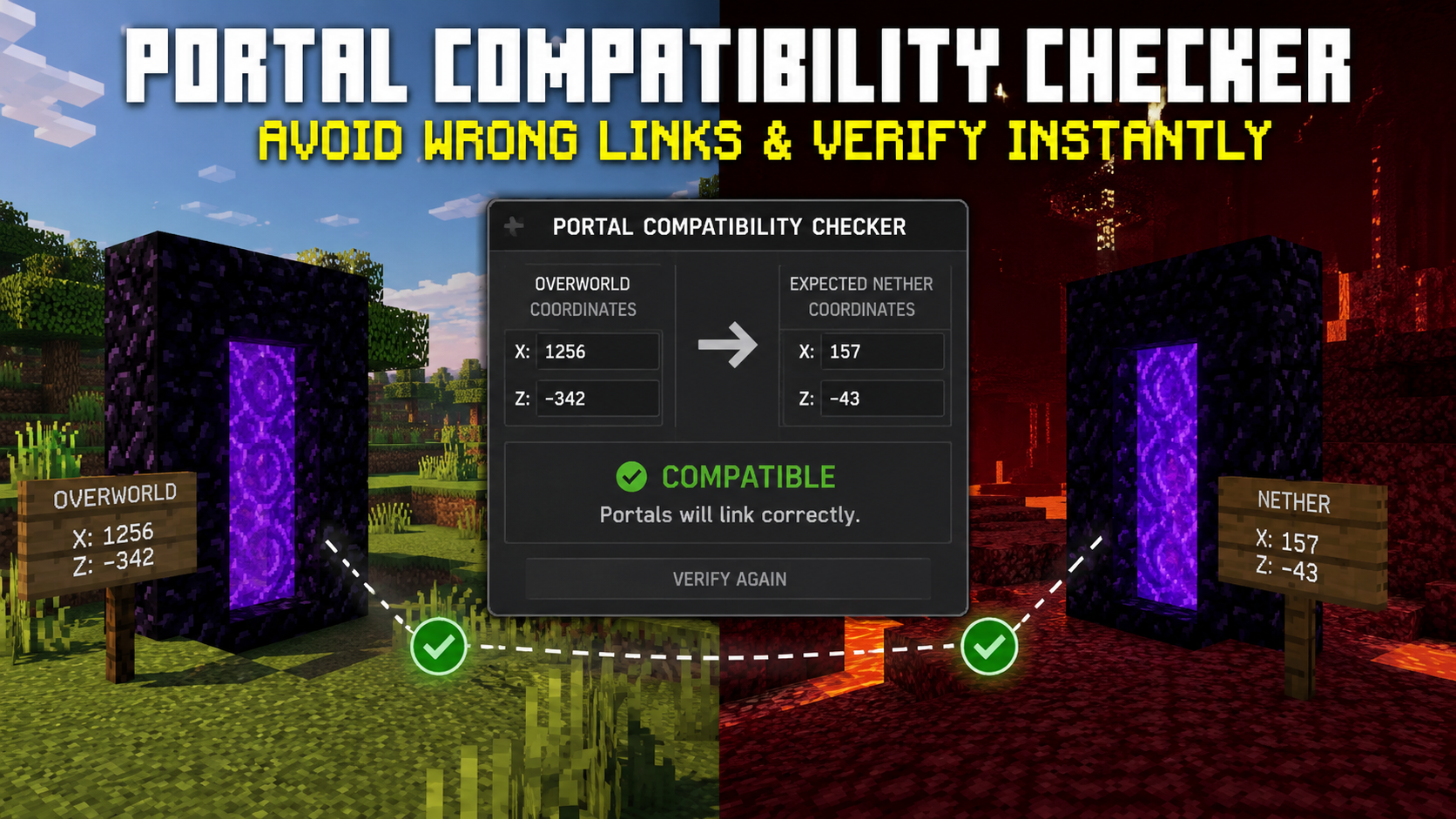
Minecraft players often run into portal problems when traveling between the Overworld and the Nether. A portal may send you to the wrong destination, connect to an unexpected portal, or create a new portal instead of using the one you built. These issues usually occur because portal coordinates, linking distance, and portal placement are misaligned. A portal compatibility checker helps players verify whether two portals will connect as expected before they spend time building them.
If you want to test coordinates instantly, you can use the Nether Portal Calculator available here.
This guide explains how portal compatibility works, how a Minecraft portal compatibility checker evaluates portal pairs, how linking distances affect portal behavior, and how to prevent wrong portal connections. You will also learn how a nether portal compatibility checker, portal linking checker, and nether portal link checker can help you build reliable portal networks in survival worlds, multiplayer servers, and large-scale Minecraft projects.
What Is a Portal Compatibility Checker?
A portal compatibility checker is a tool that determines whether two Nether portals are likely to connect correctly based on their coordinates, distance, and Minecraft’s portal-linking rules. Instead of guessing where a portal will lead, players can test both portal locations before building them.
Many players think portal linking only depends on dividing Overworld coordinates by eight. While coordinate conversion is a major part of the process, Minecraft also checks for nearby portals before deciding where to send the player. Because of this, two portals that appear correct on paper may still connect incorrectly if another portal is located within the search range.
A modern Minecraft portal compatibility tool examines more than simple coordinate conversion. It can compare coordinate pairs, detect possible conflicts, identify overlapping portal ranges, and warn players when multiple portals may interfere with one another.
The purpose of a Nether portal connection checker is to reduce trial and error. Instead of building portals and discovering problems afterward, players can verify compatibility in advance and avoid costly rebuilding projects.
Why Portal Compatibility Matters in Minecraft
Portal compatibility affects every type of Minecraft world. A single incorrect portal can create confusion, waste resources, and disrupt transportation systems.
When portals are linked properly, players can travel long distances efficiently. When portals are not compatible, the game may redirect players to a different destination or generate a new portal in an unexpected location.
This becomes especially important when building villages, trading halls, mob farms, bases, and transportation hubs. A portal sync checker Minecraft tool helps players maintain accurate travel routes between important locations.
Compatibility also matters in multiplayer environments. When several players build portals in the same region, portal conflicts become more common. A Nether portal pairing checker can help identify these conflicts before they affect an entire server network.
How Nether Portal Linking Works in Minecraft
Every time a player enters a portal, Minecraft converts the portal coordinates and searches for an existing portal in the destination dimension. If a suitable portal is found, the player is sent there. If no suitable portal exists, the game generates a new portal automatically.
The portal system does not permanently remember portal pairs. Instead, Minecraft performs a fresh search whenever a portal is used. This is why portal connections can change after new portals are built nearby.
A portal link checker for Minecraft works by simulating this process before the player enters the portal. It predicts whether Minecraft will select the intended destination portal or choose another portal within the search area.
Many portal issues occur because players only focus on coordinates and ignore nearby portals. A Minecraft Nether portal checker helps reveal these hidden conflicts.
The 8:1 Coordinate Conversion Rule
The foundation of portal linking is the 8:1 coordinate ratio between the Overworld and the Nether. For every block traveled in the Nether, the equivalent distance in the Overworld is eight blocks. Minecraft converts portal coordinates using this ratio whenever a player changes dimensions.
The conversion works like this:
| Direction | Formula |
| Overworld → Nether | Divide X and Z by 8 |
| Nether → Overworld | Multiply X and Z by 8 |
| Y Coordinate | Remains the same |
For example:
| Location | Coordinates |
| Overworld Portal | X 800, Y 64, Z 400 |
| Matching Nether Portal | X 100, Y 64, Z 50 |
This conversion creates the starting point for portal compatibility calculations. A Minecraft coordinate portal checker uses these values to determine whether the destination portal is located where Minecraft expects it to be.
Even though the math appears simple, portal compatibility involves more than coordinate conversion. The game still performs portal searches after calculating the destination position. That is why a Nether portal alignment checker can be useful when multiple portals exist nearby.
What the Portal Compatibility Checker Calculates
A portal compatibility checker evaluates several factors before deciding whether two portals are compatible.
The first calculation is coordinate conversion. The tool converts Overworld coordinates into Nether coordinates or converts Nether coordinates back into Overworld coordinates.
The second calculation involves portal distance. A portal distance checker in Minecraft measures how far portals are from one another after coordinate conversion.
The third calculation checks for overlap. If another portal is located within Minecraft’s search range, that portal may become the preferred destination.
The fourth calculation analyzes portal priority. Minecraft generally chooses the portal closest to the converted destination coordinate. If two portals compete for the same location, the closest portal often wins.
A high-quality Nether portal match checker combines all these checks into a single result. Instead of displaying only coordinates, it shows whether the portal pair is likely to work correctly.
How to Use the Portal Compatibility Checker
Using a portal compatibility checker is straightforward. The process begins by entering portal coordinates from both dimensions.
Most compatibility tools allow players to test existing portals, planned portals, or entire portal networks. The goal is to identify linking problems before they occur.
A Minecraft portal linking tool becomes especially useful when multiple bases, farms, or transportation routes share the same Nether region.
Entering Overworld Coordinates
Start by entering the exact Overworld coordinates of the portal you want to test.
Accuracy matters because even small coordinate differences can affect portal behavior. Using approximate coordinates can produce misleading results.
Most players obtain coordinates using the in-game debug screen. Once entered into the checker, the tool converts the coordinates to their expected Nether location.
This step forms the foundation of every Overworld Nether Portal Checker calculation.
Entering Nether Coordinates
Next, enter the coordinates of the Nether portal that should connect to the Overworld portal.
The checker compares the actual Nether coordinates against the expected coordinates generated from the Overworld conversion.
If the portal is positioned close enough to the expected location, compatibility increases. If it is too far away, the tool may flag a potential linking issue.
This comparison is a core function of every Nether portal link checker.
Understanding the Results
After processing both coordinate sets, the tool displays compatibility information.
A positive result usually means the portals are likely to connect correctly.
A warning result often means another portal may interfere with the connection.
A failed result may indicate that the portal is outside the preferred range or that Minecraft is likely to choose a different portal.
This information allows players to adjust portal placement before building, making a Minecraft portal fix checker useful for troubleshooting as well as planning.
How the Minecraft Portal Compatibility Checker Determines Compatibility
A Minecraft portal compatibility checker follows a process similar to Minecraft’s internal portal logic.
The tool begins by calculating the expected destination coordinates. After that, it evaluates nearby portals and measures their distance from the expected location.
Minecraft generally selects the closest valid portal to the converted coordinate. Because of this behavior, compatibility depends on both accuracy and portal placement.
A checker may classify portals into several categories:
| Compatibility Level | Meaning |
| Compatible | Portals should connect correctly |
| Likely Compatible | Small differences exist but should still work |
| Conflict Detected | Another portal may interfere |
| Incompatible | Portal linking problems are likely |
The purpose of the tool is not only to calculate coordinates but also to predict Minecraft’s portal selection behavior.
This is why a Nether portal compatibility checker provides more useful information than a simple coordinate converter.
Portal Compatibility Formula Explained
Portal compatibility starts with coordinate conversion, but compatibility calculations continue beyond the basic formula.
The standard conversion formula is:
Overworld X ÷ 8 = Nether X
Overworld Z ÷ 8 = Nether Z
Nether X × 8 = Overworld X
Nether Z × 8 = Overworld Z
Minecraft then searches for nearby portals around the converted destination coordinate. If multiple portals are available, the nearest portal usually becomes the destination.
This means compatibility depends on both coordinate accuracy and portal proximity.
A portal linking checker combines these variables into a single compatibility score that helps players determine whether two portals are properly aligned.
Distance Checks Between Existing Portals
Distance analysis is one of the most important parts of compatibility testing.
Two portals may have perfect coordinate conversion but still produce incorrect results if another portal exists nearby.
Minecraft searches for portals around the converted destination coordinate before creating a new portal. Existing portals can override intended portal pairs when they are closer to the calculated destination.
This is why experienced players often use a Nether portal compatibility checker before expanding their portal network.
Distance calculations help reveal conflicts that coordinate conversion alone cannot detect.
Understanding Portal Search Radius and Linking Range
One of the most misunderstood parts of Minecraft portal mechanics is the portal search radius. Many players believe that matching coordinates automatically guarantees a correct connection. In reality, Minecraft searches for existing portals near the converted destination before deciding where to send the player.
When you enter a Nether portal, the game calculates the expected destination coordinates and then scans the surrounding area for available portals. If multiple portals are located within the search range, Minecraft usually selects the portal closest to the calculated destination point.
This behavior explains why some portals suddenly start connecting to the wrong location after a new portal is built nearby. The game is not broken. It is simply selecting a portal that better matches its search criteria.
A portal compatibility checker helps players visualize these portal search areas before construction begins. Instead of discovering conflicts later, players can see potential issues while planning their portal network.
For larger portal systems, understanding linking range becomes even more important. Transportation hubs, multiplayer server networks, and long-distance travel routes often contain dozens of portals. A portal distance checker in Minecraft can identify overlap zones that might cause unexpected portal behavior.
Players who want a deeper understanding of coordinate calculations can also read this guide on Nether Portal Coordinates.
When Two Portals Are Considered Compatible
Two portals are generally considered compatible when Minecraft consistently connects them without selecting another portal.
Compatibility starts with coordinate conversion. The Nether portal should be positioned close to the coordinates generated from the Overworld portal. If the converted coordinates match closely, the chances of successful linking increase.
Distance from nearby portals also plays a major role. Even perfectly converted portals may experience problems if another portal exists closer to Minecraft’s calculated destination point.
A Minecraft portal compatibility checker evaluates all of these conditions together. Instead of looking only at coordinates, it examines the entire linking environment.
Compatible portals usually share several characteristics. Their coordinates align correctly, nearby portal interference is minimal, and the destination portal remains the closest valid option after conversion.
When these conditions are met, players can travel between dimensions repeatedly without generating new portals or being redirected elsewhere.
A Nether portal compatibility checker is especially useful when creating transportation systems that connect multiple bases, villages, or resource farms.
When Two Portals Will Not Link Correctly
Not every portal pair will function as expected. Even small placement mistakes can cause linking failures.
A portal becomes incompatible when Minecraft determines that another portal is a better destination than the intended portal. This often happens when portals are clustered together or when coordinate conversions are calculated incorrectly.
A portal linking checker helps identify these situations before they become a problem. By testing portal locations in advance, players can avoid rebuilding portals later.
Incorrect linking does not always mean the portal will fail. Sometimes the portal still functions but connects to a nearby portal instead of the desired one. In larger portal systems, this can create confusion and disrupt travel routes.
Portal Distance Conflicts
Portal distance conflicts occur when two or more portals compete for the same converted destination area.
Imagine a player creates a new portal near an existing Nether hub. Even if the new portal has correct coordinates, the hub portal may still be closer to Minecraft’s target location.
When this happens, the game often selects the hub portal instead of the newly created portal.
A Nether portal match checker can reveal these conflicts by comparing distances between all nearby portals. This makes it easier to determine whether portal relocation is necessary.
Distance conflicts become more common as portal networks grow. Large multiplayer servers frequently encounter these issues because many players build portals within the same regions.
Existing Portal Interference
Existing portals are one of the biggest causes of portal linking problems.
When Minecraft searches for a destination portal, it prioritizes portals already present in the world. If an older portal sits closer to the calculated coordinates, it may override the intended portal connection.
This can lead to situations where newly constructed portals never function as planned.
A Nether portal connection checker helps identify older portals that may interfere with new portal placements. Instead of searching manually, players can locate conflicts through compatibility testing.
Existing portal interference often explains why portals seem to change behavior after new construction projects begin nearby.
Common Causes of Wrong Portal Linking
Wrong portal linking usually results from predictable mistakes rather than random game behavior.
One of the most common issues is incorrect coordinate conversion. Players sometimes forget to divide Overworld coordinates by eight or multiply Nether coordinates by eight. Even small calculation errors can shift the portal destination enough to affect compatibility.
Another common issue involves portal crowding. When too many portals exist within a small area, Minecraft has multiple destination choices available.
Portal elevation can also affect linking behavior. While X and Z coordinates carry the greatest influence, portal placement at different heights can occasionally influence which portal becomes the preferred destination.
A Minecraft portal linking tool helps detect these problems before portals are built.
Other causes include manually moving portals after construction, creating temporary portals during exploration, and expanding portal networks without testing compatibility.
Many players assume the game is generating bugs when these situations occur. In reality, the portal system usually functions according to its normal rules.
Signs Your Nether Portals Are Not Compatible
Portal incompatibility often reveals itself through repeated travel issues.
One warning sign is arriving at different destinations when using the same portal multiple times. If travel routes seem inconsistent, compatibility problems may exist somewhere within the portal network.
Another common sign is unexpected portal generation. When Minecraft creates a new portal instead of connecting to an existing one, it often indicates that the intended destination portal falls outside the preferred range.
Players may also notice one-way portal connections. Traveling from Portal A to Portal B works correctly, but returning from Portal B sends the player somewhere else.
A Minecraft portal fix checker can help diagnose these symptoms by identifying the source of the conflict.
In multiplayer environments, portal incompatibility may affect multiple players at once. New portals created by one player can influence the travel routes of others.
These issues tend to become more noticeable as portal networks grow larger.
How to Verify Portal Links Before Building
Verifying portal compatibility before construction saves time, resources, and frustration.
The process starts by identifying the intended Overworld location. Once the coordinates are known, they can be converted to their expected Nether coordinates.
Next, players should examine nearby portals in both dimensions. Existing portals may already occupy the destination area.
A Minecraft coordinate portal checker compares these locations and determines whether the planned portal will remain the closest destination after conversion.
Testing before construction also helps players avoid expensive mistakes in survival worlds where obsidian and portal relocation require additional effort.
Large projects benefit the most from this approach. Transportation systems, hub networks, and farm connections often involve multiple portal pairs that must function together.
For players planning more advanced travel systems, this guide on Nether Portal Linking provides additional information.
Using a portal sync checker in Minecraft before construction allows players to build with confidence instead of relying on trial and error.
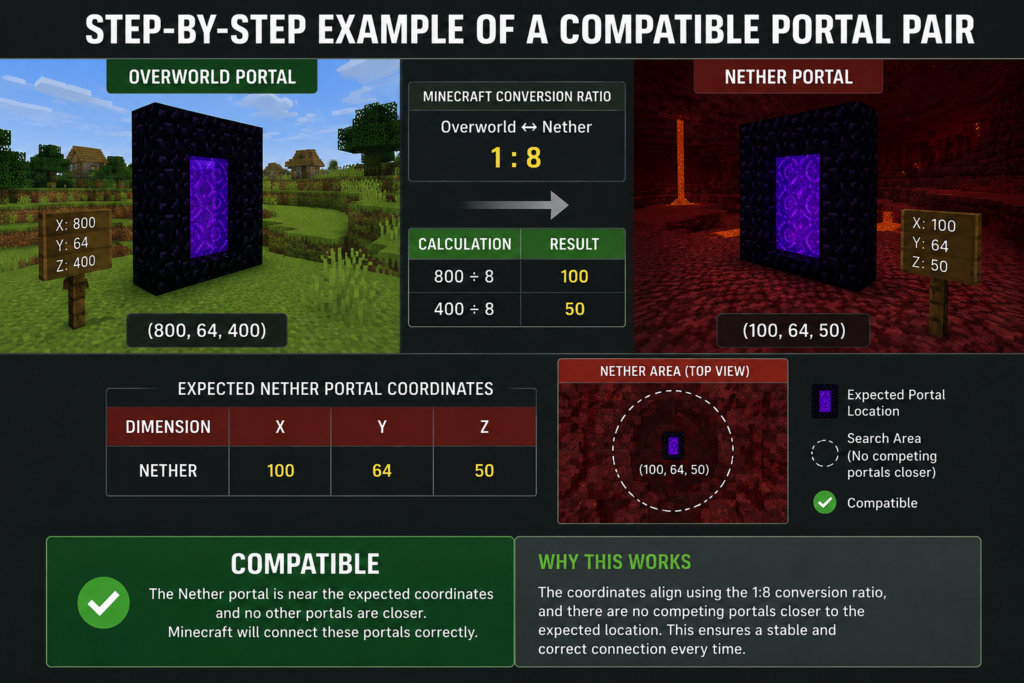
Step-by-Step Example of a Compatible Portal Pair
A practical example helps illustrate how portal compatibility works.
Suppose an Overworld portal is located at:
| Dimension | X | Y | Z |
| Overworld | 800 | 64 | 400 |
Using Minecraft’s conversion ratio:
| Calculation | Result |
| 800 ÷ 8 | 100 |
| 400 ÷ 8 | 50 |
The expected Nether portal coordinates become:
| Dimension | X | Y | Z |
| Nether | 100 | 64 | 50 |
If a Nether portal already exists near these coordinates and no competing portals are closer, Minecraft will usually connect the two portals correctly.
A Nether portal pairing checker would classify this portal pair as compatible because the coordinates align properly and no major conflicts exist.
This is the ideal situation for long-distance travel systems.
Step-by-Step Example of an Incompatible Portal Pair
Now consider a different scenario.
An Overworld portal still converts to Nether coordinates X 100 and Z 50. However, another Nether portal already exists nearby at X 96 and Z 48.
Even if a new portal is built at X 100 and Z 50, Minecraft may select the older portal because it falls closer to the destination point during portal searches.
The result is an unexpected connection.
| Portal | X | Z |
| Intended Portal | 100 | 50 |
| Existing Portal | 96 | 48 |
In this example, the existing portal creates interference.
A portal link checker in Minecraft would identify the conflict before construction begins. Instead of discovering the issue afterward, the player could relocate one of the portals and eliminate the overlap.
This type of compatibility problem is extremely common in established Minecraft worlds.
Minecraft Portal Compatibility Checker vs Manual Calculations
Manual coordinate calculations have been used by Minecraft players for years. They remain useful for understanding basic portal mechanics, but they do not tell the full story.
A player can divide coordinates by eight and still experience portal linking issues. The reason is that coordinate conversion represents only one part of Minecraft’s portal-selection process.
A Minecraft portal compatibility tool evaluates additional factors such as nearby portal interference, portal distance conflicts, and destination prioritization.
Manual calculations answer the question, “Where should the portal be?”
A Nether portal alignment checker answers a different question: “Will Minecraft actually use this portal?”
That distinction becomes more valuable as portal networks become larger and more complex.
Why Manual Portal Calculations Often Fail
Manual calculations fail because they focus exclusively on coordinate conversion.
Players calculate the expected coordinates, build the portal, and assume the connection will work. What they often overlook is Minecraft’s portal search system.
The game does not simply teleport players to exact coordinates. It actively searches for nearby portals and chooses what it considers the best destination.
This means a portal can have perfect coordinates and still produce incorrect results.
A portal compatibility checker, an overworld nether portal checker, and a Minecraft nether portal checker account for factors that traditional calculations ignore.
For this reason, many advanced players now use compatibility tools before creating large portal networks. Testing compatibility beforehand helps prevent travel problems, reduces rebuilding effort, and creates more reliable transportation systems across the entire world.
Benefits of Using a Nether Portal Link Checker
A Nether portal link checker helps players avoid many of the portal problems that commonly appear in Minecraft worlds. Instead of relying on trial and error, players can test portal compatibility before placing obsidian, lighting portals, or expanding their transportation network.
One of the biggest benefits is accuracy. Manual coordinate conversion provides only part of the information needed for successful portal linking. A compatibility checker evaluates coordinate alignment, nearby portals, and potential conflicts at the same time.
Another benefit is time savings. Relocating portals can take a considerable amount of effort, especially in survival worlds where resources must be collected manually. By identifying problems before construction starts, players avoid unnecessary rebuilding.
A portal compatibility checker also improves planning. Players can design transportation routes, Nether highways, and portal hubs with a better understanding of how the game will handle each connection.
As portal networks become larger, compatibility testing becomes even more valuable. A single portal conflict can affect multiple travel routes. Using a Nether portal connection checker helps maintain a more stable and predictable network.
Portal Linking Checker for Large Minecraft Worlds
Large Minecraft worlds often contain dozens of portals spread across different regions. What starts as a simple portal setup can eventually become a complex transportation system connecting bases, villages, farms, strongholds, and resource locations.
As more portals are added, the likelihood of portal conflicts increases. A portal built months ago may begin interfering with a newly constructed portal even though both locations appear correct.
A portal linking checker helps players manage these expanding networks by identifying overlap zones and compatibility risks.
Large worlds also tend to contain older portals that players may have forgotten about. These hidden portals can unexpectedly become preferred destinations during portal searches.
A Minecraft portal compatibility checker allows players to review existing portal layouts and identify issues before they spread throughout the network.
For players building long-distance travel systems, understanding portal spacing is just as important as coordinate conversion.
You can learn more about portal spacing and travel calculations here: https://calcurax.com/nether-portal-distance/
When portal distance is planned correctly, travel becomes faster, and portal conflicts become much easier to manage.
Checking Compatibility for Multiple Portal Networks
Many advanced Minecraft players eventually move beyond individual portal pairs and begin building entire portal networks.
A portal network consists of multiple interconnected portals designed to provide efficient transportation throughout the world. These systems often connect major bases, resource farms, trading centers, and exploration routes.
Managing multiple portal connections manually can become difficult. Every new portal has the potential to affect existing links.
A Minecraft portal compatibility tool helps evaluate how new portals interact with the rest of the network.
Rather than testing each portal separately, players can analyze compatibility across the entire system and identify areas where portal search ranges overlap.
This type of planning reduces unexpected behavior and helps keep transportation routes organized.
Hub-Based Portal Systems
Hub-based portal systems are among the most popular transportation designs in Minecraft.
In this setup, multiple Overworld locations connect to a central Nether hub. Players travel through the hub and then branch out to different destinations.
The efficiency of a hub depends on portal compatibility. If portal coordinates are not aligned correctly, players may arrive at unintended destinations.
A Nether portal pairing checker becomes especially useful when designing hub systems because multiple portals often exist within a relatively small Nether area.
Compatibility testing helps maintain clean and reliable connections between each destination and the central hub.
Portal Compatibility in Multiplayer Servers
Portal compatibility becomes more challenging in multiplayer environments because multiple players are constantly adding new portals.
A portal that functions perfectly one day may behave differently after another player constructs a portal nearby.
Server communities often experience portal confusion when players independently create portals without checking existing connections.
A Minecraft Nether portal checker can help server administrators and players maintain organized portal networks.
Compatibility testing allows players to coordinate portal placement and reduce interference between different bases.
Large servers frequently establish portal-building guidelines to minimize conflicts. These guidelines often include coordinated planning, portal spacing requirements, and compatibility testing before new portals are added.
A portal sync checker Minecraft supports these efforts by helping players verify that their portals fit within the existing transportation structure.
Portal Compatibility for Survival Worlds
Survival mode introduces additional challenges because resources are limited.
Building and relocating portals requires obsidian, time, and effort. Every mistake carries a greater cost than it does in Creative mode.
A Minecraft portal fix checker can save valuable resources by identifying compatibility issues before construction begins.
Survival players often create portals for practical purposes such as accessing Nether resources, connecting distant bases, or shortening travel routes. Reliable portal connections make these activities much more efficient.
Compatibility testing also helps reduce dangerous situations. Incorrect portal links can leave players stranded far from their intended destination, sometimes in hostile areas of the Nether.
By checking compatibility in advance, players can build transportation systems that remain dependable throughout long-term survival gameplay.
Portal Compatibility for Creative Builds
Creative mode gives players complete freedom to experiment with portal designs, transportation systems, and large-scale infrastructure projects.
Many Creative builders create detailed cities, adventure maps, roleplay servers, and transportation networks that depend on accurate portal behavior.
A Nether portal compatibility checker helps maintain consistency across these projects.
Because Creative worlds often contain a high concentration of portals, compatibility issues can appear more frequently than in smaller survival worlds.
Testing portal connections during the design phase allows builders to focus on creativity rather than troubleshooting.
A portal distance checker in Minecraft can also help map creators understand how portals interact across different regions of the world.
This makes Creative mode an excellent environment for designing and testing advanced portal systems before recreating them elsewhere.
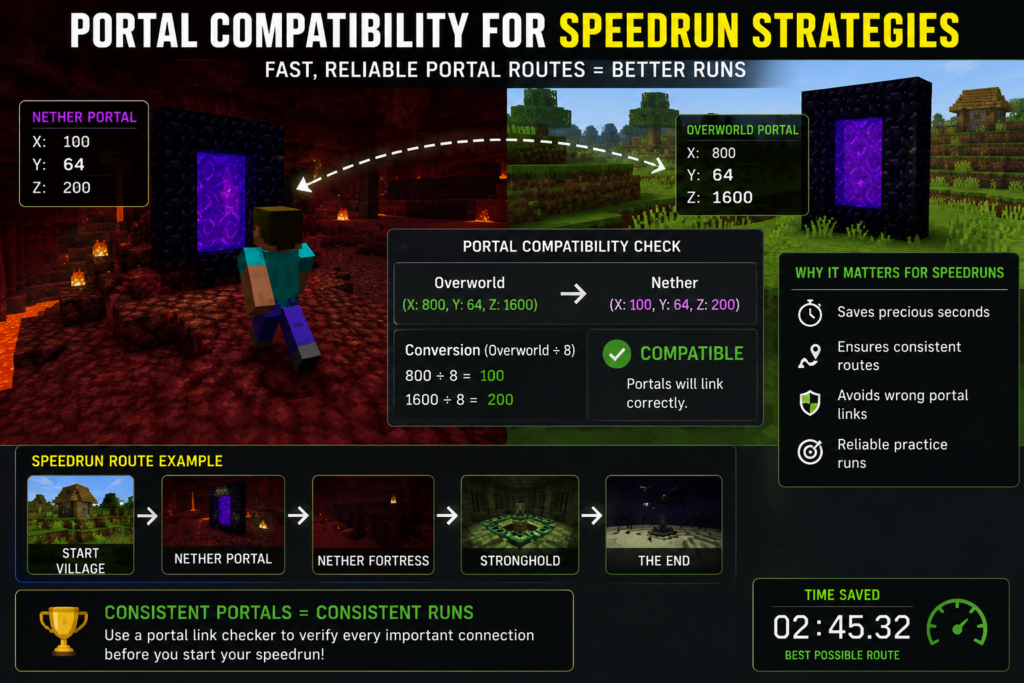
Portal Compatibility for Speedrun Strategies
Speedrunners depend on efficient travel routes to save time.
Even small portal linking problems can affect route planning and increase travel times during a run.
A portal compatibility checker helps speedrunners verify that portal destinations behave as expected.
Many speedrunning strategies involve carefully selected portal locations that provide fast access to key structures and resources. If portal compatibility is overlooked, these strategies may become unreliable.
A portal link checker in Minecraft allows players to test route consistency before attempting serious runs.
Predictable portal behavior is especially valuable when speedrunners repeatedly practice the same world seed.
By removing uncertainty from portal travel, compatibility testing supports more consistent execution.
How Existing Portals Affect New Portal Placement
Every new portal interacts with the portals that already exist in the world.
Minecraft does not evaluate portals individually. Instead, it considers all available portals within its search process when determining a destination.
This means that an older portal can influence a newly constructed portal even if the player did not intend for the two portals to be connected.
A Nether portal match checker helps reveal these interactions before construction begins.
The effect becomes stronger as more portals are added to a world. What seems like a simple new portal can unexpectedly alter travel routes that have been functioning correctly for months.
Players often assume that portal problems begin when a new portal is built. In reality, the issue is usually caused by how the new portal interacts with existing portal locations.
Compatibility testing provides a clearer picture of these relationships.
Understanding Portal Generation Priority
When Minecraft searches for a destination portal, it must decide which portal to use.
This decision process is often called portal generation priority.
The game typically favors portals that are closest to the converted destination coordinates. If multiple portals are available, proximity usually determines which portal becomes the preferred destination.
A Minecraft coordinate portal checker helps estimate which portal Minecraft is most likely to select.
Understanding portal priority is important because it explains many of the linking issues players encounter.
Two portals may both appear valid, but only one portal can become the preferred destination.
A Nether portal alignment checker evaluates these situations and helps players predict portal behavior before construction begins.
When players understand portal priority, troubleshooting becomes much easier because the logic behind portal selection becomes more predictable.
Overlapping Portal Detection and Prevention
Portal overlap occurs when multiple portals compete for the same destination area.
Overlapping portals are one of the most common causes of incorrect portal linking in established Minecraft worlds.
A portal compatibility checker helps identify overlap before it creates travel problems.
Detecting overlap early allows players to adjust portal locations while changes are still easy to make.
Several factors contribute to overlap, including portal crowding, inaccurate coordinate conversion, and uncontrolled network expansion.
A Nether portal compatibility checker examines portal spacing and destination alignment to identify these risks.
Prevention is usually easier than correction. Careful planning, compatibility testing, and proper portal spacing help reduce overlap throughout the life of a world.
Combining coordinate planning with compatibility testing creates a much more reliable portal network and reduces the chance of future conflicts.
How to Fix Incorrect Portal Links
Incorrect portal links are one of the most frustrating problems in Minecraft. A portal may connect to the wrong destination, generate a new portal unexpectedly, or send players to a location that was never intended. The good news is that most portal linking problems can be corrected once the source of the conflict is identified.
The first step is determining whether the issue is caused by incorrect coordinates, nearby portal interference, or portal overlap. A portal compatibility checker can help identify the exact reason the portal is failing to connect correctly.
After identifying the issue, players can adjust portal placement, remove conflicting portals, or rebuild portal connections to match Minecraft’s linking rules more closely.
Fixing portal links becomes much easier when players understand how the game chooses portal destinations. Rather than guessing, compatibility testing provides a structured way to troubleshoot and repair portal networks.
Relocating a Nether Portal
Relocating a Nether portal is often the fastest solution when compatibility issues occur.
If a portal is too far from its expected coordinates, Minecraft may prefer a different portal during its destination search. Moving the portal closer to the converted coordinates can improve compatibility and reduce conflicts.
Before relocating a portal, players should calculate the expected destination coordinates and compare them to the portal’s current position.
A Minecraft coordinate portal checker can help determine whether the portal sits within a suitable range.
Relocation is especially useful when portal conflicts involve multiple nearby portals. Moving a portal, even a short distance, can sometimes eliminate interference and restore proper linking.
Many advanced transportation systems rely on careful portal placement to maintain reliable travel routes.
Rebuilding a Broken Portal Connection
Some portal issues cannot be solved through relocation alone.
In cases where portal links have become heavily disrupted, rebuilding the connection may be the better option.
This process usually involves removing the problematic portal, calculating the correct coordinates, and constructing a replacement portal at the intended destination.
A Minecraft portal fix checker can verify the new portal before it is activated.
Rebuilding allows players to start with a clean connection and avoid carrying old portal conflicts into the new setup.
Although rebuilding requires additional effort, it often produces more reliable results when portal networks have become complicated.
Advanced Portal Linking Scenarios
Simple portal pairs are relatively easy to manage, but advanced portal systems introduce additional challenges.
As worlds grow larger, players often create transportation networks that connect multiple locations through a limited number of portals. These arrangements can create unusual compatibility situations that require careful planning.
A Minecraft portal compatibility tool becomes increasingly valuable when dealing with advanced portal layouts because standard coordinate conversion alone may not reveal all potential conflicts.
Understanding these advanced scenarios helps players build more efficient transportation systems and avoid unexpected portal behavior.
Multiple Overworld Portals to One Nether Area
Many players create multiple Overworld portals that connect to the same general region in the Nether.
This approach is common when several bases, farms, or villages are located near one another in the Overworld but share a single Nether transportation route.
The challenge is preventing these portals from competing for the same destination.
A Nether portal pairing checker can identify whether multiple Overworld portals are attempting to connect to the same Nether portal.
When conflicts appear, players may need to adjust portal spacing or create separate destination portals.
Proper planning allows multiple Overworld portals to function efficiently without disrupting each other.
Multiple Nether Portals to One Overworld Area
The opposite situation can also occur.
Players sometimes build several Nether portals that lead back to a single region in the Overworld. This setup often appears in large transportation hubs or resource collection networks.
Without proper spacing, Minecraft may struggle to distinguish between portal destinations.
A Nether portal alignment checker helps evaluate whether these portals are sufficiently separated to maintain unique connections.
Testing compatibility becomes particularly important when many portals share the same destination area.
Careful coordination planning helps keep travel routes organized and predictable.
Portal Placement Best Practices
Good portal placement can prevent many linking problems before they occur.
One of the most effective practices is calculating coordinates before building. Players who place portals first and calculate later often encounter compatibility issues that could have been avoided.
Maintaining a reasonable distance between portals is another helpful strategy. Crowded portal networks are far more likely to experience interference and overlap.
A portal distance checker in Minecraft can help evaluate spacing before construction begins.
Players should also consider future expansion. A portal network that works well today may become crowded after additional portals are added.
Planning leaves room for growth and reduces the need for major adjustments later.
Regular compatibility testing is another useful habit. A portal sync checker in Minecraft can verify that portal networks continue functioning correctly as the world evolves.
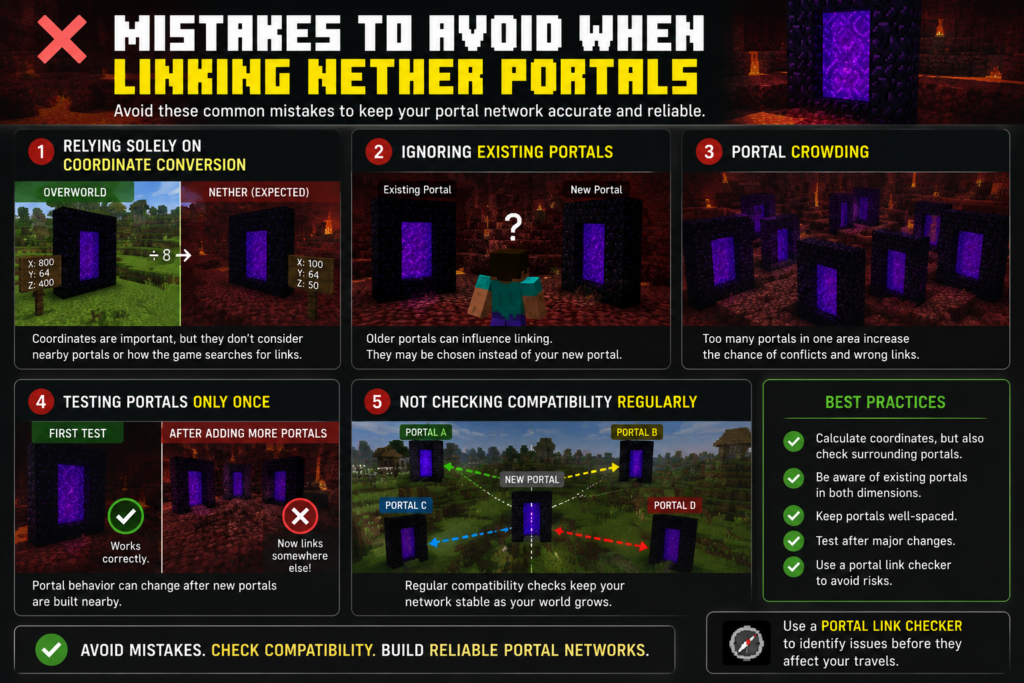
Mistakes to Avoid When Linking Nether Portals
Many portal problems can be traced back to a small number of common mistakes.
One frequent mistake is relying solely on coordinate conversion. While coordinate calculations are important, they do not account for nearby portals or portal search behavior.
Another mistake is ignoring existing portals. Players often focus on the portal they are building and overlook older portals that may already influence the area.
Portal crowding is another common issue. Building too many portals within a small region increases the likelihood of conflicts.
A portal link checker for Minecraft can help identify these risks before they affect travel routes.
Some players also make the mistake of testing portals only once. Portal behavior may change after additional portals are added nearby.
Regular compatibility checks help keep transportation systems stable over time.
Avoiding these mistakes makes portal networks easier to maintain and more reliable in the long run.
Portal Compatibility Checker Accuracy and Limitations
A portal compatibility checker is a powerful planning tool, but it is important to understand its limitations.
The tool can analyze coordinates, portal spacing, compatibility risks, and potential conflicts. It can estimate how Minecraft is likely to handle portal connections based on available information.
However, no checker can perfectly account for every possible world condition.
Unexpected portal placements, hidden portals, temporary exploration portals, and future construction projects may influence portal behavior after compatibility calculations are completed.
This does not reduce the value of compatibility testing. In most situations, a Minecraft portal compatibility checker provides a far more accurate prediction than manual calculations alone.
Players should view compatibility tools as planning aids that improve decision-making rather than guarantees that every portal will behave perfectly in every circumstance.
Even with these limitations, a Nether portal compatibility checker remains one of the most effective ways to reduce portal linking problems.
Frequently Asked Questions
Can Two Overworld Portals Link to the Same Nether Portal?
Yes. Two Overworld portals can connect to the same Nether portal if their converted destination coordinates fall within the same portal search area. This is one reason compatibility testing is useful when building multiple portals close together. A Nether portal match checker can help identify these situations before they create travel issues.
Why Does My Portal Connect to the Wrong Location?
The most common reason is portal interference. Another portal may be closer to Minecraft’s calculated destination coordinates than the portal you intended to use. A Nether portal connection checker can help determine which portal is being prioritized and why.
How Far Apart Should Linked Portals Be?
The ideal spacing depends on the size of the portal network and the locations involved. Larger portal systems generally benefit from greater separation between portals. A portal distance checker in Minecraft can help evaluate whether portal spacing is likely to cause overlap.
Does Portal Size Affect Compatibility?
Portal size usually has little impact on compatibility. Minecraft primarily evaluates portal location rather than portal dimensions when determining connections. Coordinate alignment and portal distance remain the most important factors.
Can Existing Portals Override New Ones?
Yes. Existing portals frequently influence new portal connections. If an older portal is closer to Minecraft’s calculated destination coordinates, the game may choose that portal instead of the newly constructed one. This is why a Minecraft Nether portal checker can be helpful before adding new portals to an established network.
Final Thoughts on Using a Portal Compatibility Checker
A portal compatibility checker helps players build more reliable portal networks by identifying compatibility issues before they become problems. Whether you are creating a simple portal pair, designing a large transportation hub, or managing a multiplayer server network, compatibility testing can save time and reduce frustration.
Understanding coordinate conversion is only part of successful portal linking. Portal spacing, existing portals, destination priority, and overlap detection all play important roles in determining how Minecraft connects portals.
Players who use a Minecraft portal compatibility checker, portal linking checker, or nether portal compatibility checker gain a clearer understanding of how portal networks function and how potential conflicts can be avoided.
By combining coordinate planning with compatibility testing, players can create portal systems that remain accurate, efficient, and dependable throughout the life of their Minecraft world.