

Understanding Nether portal distance is one of the most useful skills for Minecraft players who want reliable travel between locations. Many players build portals without thinking about coordinates, only to discover that their portals connect to the wrong destination or create unexpected links. These issues usually happen because of portal linking mechanics, coordinate conversion, and portal spacing rules.
If you want accurate travel routes, it helps to understand how Minecraft handles portal connection distance, portal matching distance, and the nearest portal search system. Whether you play survival, build large cities, create farms, or manage a multiplayer server, proper Nether portal placement distance can save time and prevent frustrating linking problems.
If you need help converting coordinates while reading this guide, you can use the Nether Portal Calculator.
This guide explains Minecraft Nether portal distance, portal spacing, portal overlap, portal search radius, coordinate conversion, multiplayer setups, and Nether hub systems in simple language so you can build portals that connect exactly where you want them to.
What Is Nether Portal Distance in Minecraft?
Before learning advanced portal setups, it helps to understand what Nether portal distance actually means. In Minecraft, portals are not permanently connected. Instead, the game calculates a destination every time a player travels between dimensions. Because of this system, the distance between portals affects where players appear after teleporting.
The term Minecraft Nether portal distance refers to the relationship between portal locations in the Overworld and the Nether. It also includes the distance Minecraft checks when searching for a portal near the converted coordinates.
Many players think portals work like paired doors. In reality, Minecraft uses a search process that looks for nearby portals based on coordinates. This is why two portals that appear far apart can sometimes connect to the same destination.
Understanding nether portal proximity, portal destination distance, and linked portal distance helps players build transportation systems that work consistently.
Some of the most common reasons players research how far apart Nether portals should be include:
| Common Goal | Why Distance Matters |
| Separate Bases | Prevent portal overlap |
| Multiplayer Servers | Avoid portal conflicts |
| Nether Hubs | Create organized routes |
| Farms | Maintain accurate travel |
| Long Distance Travel | Reduce travel time |
When portal spacing is planned correctly, travel becomes faster and much more predictable.
How Nether Portal Linking Works
Portal linking is based on coordinate conversion. Every time a player enters a portal, Minecraft calculates where that player should appear in the other dimension. After converting coordinates, the game searches for the nearest valid portal.
This process is known as portal linking mechanics and forms the foundation of all portal systems in Minecraft.
The game does not simply connect two portals forever. Instead, it repeatedly checks coordinates and uses a search process to locate the most suitable portal.
This behavior explains many common problems involving portal mismatch distance, broken portal linking distance, and unexpected portal generation.
The linking system depends on:
| Factor | Effect on Linking |
| Coordinates | Determines destination |
| Portal Distance | Affects portal selection |
| Existing Portals | May override new links |
| Search Radius | Controls portal detection |
| Dimension Conversion | Converts travel locations |
Players who understand these mechanics can build large transportation networks without creating linking errors.
The 8:1 Coordinate Conversion Rule
The most important rule in portal travel is the 8x Nether distance rule.
Minecraft uses a conversion ratio where one block traveled in the Nether equals eight blocks traveled in the Overworld. This ratio is often called the Minecraft 1:8 coordinate ratio.
For example:
| Nether Travel | Overworld Equivalent |
| 1 Block | 8 Blocks |
| 10 Blocks | 80 Blocks |
| 50 Blocks | 400 Blocks |
| 100 Blocks | 800 Blocks |
| 500 Blocks | 4,000 Blocks |
This coordinate scaling system allows players to travel long distances quickly.
The formula works like this:
Overworld → Nether
X ÷ 8
Z ÷ 8
Nether → Overworld
X × 8
Z × 8
This process is known as dimension coordinate conversion, nether coordinates conversion distance, and coordinate scaling distance.
The X and Z coordinates matter most because portal linking relies heavily on horizontal location.
Understanding portal x z coordinates, Minecraft x z distance, and Nether portal x z ratio makes portal building much easier.
Why Nether Portal Distance Matters
Many portal problems happen because players ignore spacing and coordinate calculations. A portal may appear to be hundreds of blocks away from another portal, yet after coordinate conversion, they may end up extremely close together.
This is where Nether portal distance rules become important.
Proper spacing helps prevent:
- Portal overlap
- Incorrect portal destinations
- Random portal creation
- Shared portal routes
- Multiplayer conflicts
When portals are too close together, Minecraft may select the wrong portal during its search process. This can create confusing travel routes that become harder to fix as the world grows.
Understanding portal linking range, portal connection problems, and portal linking algorithm helps players avoid these issues before they happen.
For survival worlds, spacing portals correctly makes exploration easier.
For multiplayer servers, spacing becomes even more important because many players may be building portals at the same time.
For hub systems, proper distance planning allows dozens of portals to operate without interfering with each other.
Good planning creates a reliable portal network distance structure that remains organized as the world expands.
Minimum Distance Between Portals
One of the most common questions players ask is about the Nether portal minimum distance. Unfortunately, there is no single number that works in every situation because portal linking depends on coordinates and nearby portal locations.
Still, practical guidelines can reduce linking problems.
A safe portal separation distance usually depends on whether the portals are in the Nether or the Overworld.
Many experienced players use the following spacing recommendations.
| Dimension | Recommended Distance |
| Nether | 16–32 Blocks |
| Overworld | 128–256 Blocks |
| Large Networks | 256+ Blocks |
| Hub Systems | Coordinate-Based Planning |
These values help reduce overlapping Nether portals and improve linking accuracy.
Players building large transportation systems often rely on calculated coordinates instead of guessing portal positions.
This approach produces more accurate portal alignment distance and reduces the chance of future linking issues.
The idea is not simply to keep portals far apart. The goal is to maintain correct coordinate relationships between dimensions.
Nether Portal Distance in the Overworld
The Overworld is where most portal systems begin. Players often build portals at their base, near villages, at farms, or around resource locations. Because of the 1:8 conversion ratio, portal placement in the Overworld has a direct impact on where portals appear in the Nether.
Understanding overworld portal distance helps players avoid portal conflicts later.
Suppose two Overworld portals are 160 blocks apart.
After conversion:
160 ÷ 8 = 20
Those portals become only 20 blocks apart in the Nether.
This example shows why many players accidentally create a Nether portal overlap without realizing it.
The larger the Overworld distance, the more flexibility players have when creating separate Nether routes.
Many experienced builders calculate coordinates before constructing portals. This method creates more accurate coordinate-based portal linking and reduces troubleshooting later.
Players planning long-term worlds should think about future expansion. A portal system that works with two portals today may become difficult to manage after ten or twenty portals are added.
For that reason, good portal placement guide practices start with proper Overworld spacing rather than trying to fix issues later.
Nether Portal Distance in the Nether
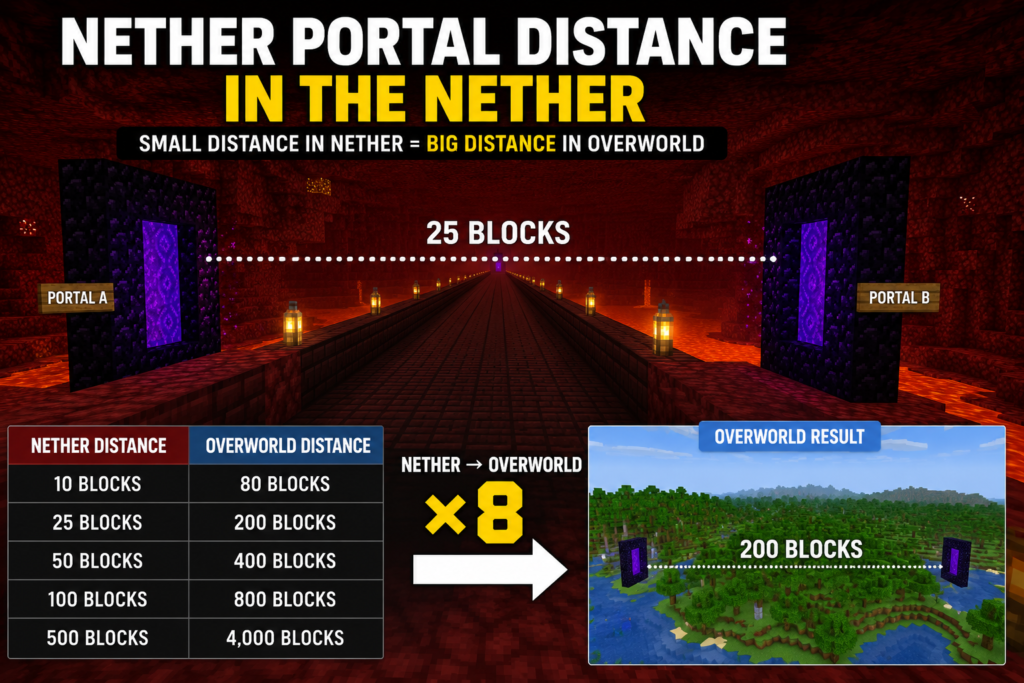
The Nether is where portal planning becomes much more important. Because of the 8x Nether distance rule, even a small change in Nether coordinates can create a large difference in the Overworld. This is why many experienced players build their transportation systems in the Nether instead of relying entirely on Overworld travel.
When discussing Nether portal distance, many players focus only on Overworld spacing. However, the Nether is where most linking decisions are made. A portal that is only 25 blocks away in the Nether represents a distance of 200 blocks in the Overworld.
The following examples show how Nether travel affects Overworld movement.
| Nether Distance | Overworld Distance |
| 10 Blocks | 80 Blocks |
| 25 Blocks | 200 Blocks |
| 50 Blocks | 400 Blocks |
| 100 Blocks | 800 Blocks |
| 500 Blocks | 4,000 Blocks |
This conversion system makes the Nether the most efficient transportation dimension in Minecraft. Players often use Nether tunnels, highways, and hub systems to reach distant locations quickly.
Understanding Nether travel distance calculator, long-distance Nether travel, and Minecraft fast travel distance concepts can help players create routes that save hundreds or even thousands of blocks of travel time.
The most successful transportation systems rely on accurate coordinate planning instead of random portal placement.
Recommended Portal Spacing for Reliable Linking
Many guides explain portal linking but never provide practical spacing recommendations. This creates confusion because players know how portals work but still do not know where to place them.
Reliable Nether portal spacing starts with coordinate calculations. When portals are placed according to converted coordinates, linking problems become much less common.
For smaller survival worlds, players usually achieve reliable results by maintaining a reasonably safe portal distance and matching portal coordinates manually.
For larger worlds, spacing should be based on coordinates rather than visual estimates.
The table below provides practical guidelines used by many experienced builders.
| Portal Type | Suggested Spacing |
| Small Survival Bases | 128–256 Overworld Blocks |
| Resource Farms | 200+ Overworld Blocks |
| Multiplayer Networks | Coordinate-Based Placement |
| Nether Hub Connections | Dedicated Hub Coordinates |
| City Networks | Large Structured Layouts |
The idea behind proper Minecraft Nether portal spacing is simple. Portals should have enough separation so Minecraft can clearly identify the intended destination.
This approach improves accurate portal placement, reduces portal conflicts, and helps maintain a clean transportation network.
Understanding Nether Portal Range
Many players search for information about the Nether portal range because they want to know how Minecraft chooses a destination portal.
The game uses a search process that checks nearby areas around the converted destination coordinates. This process is connected to the portal search area, portal detection radius, and nearest portal search system.
When Minecraft converts coordinates, it does not automatically create a new portal. Instead, it looks for an existing portal within its search area. If a valid portal is found, the game links to that portal.
This behavior explains why two portals can sometimes share a destination.
Understanding the portal linking range helps players predict how Minecraft will behave before activating a portal.
The concept of the Nether portal search radius is especially important when building multiple portals close together.
If portals are located within Minecraft’s search area, the game may select an existing portal instead of creating a new one.
This can lead to unexpected travel routes and portal overlap.
Players who understand Minecraft portal search radius, portal generation distance, and portal destination distance can build more reliable transportation systems.
What Causes Portal Overlap?
One of the most common portal problems is Nether portal overlap.
Portal overlap occurs when multiple portals compete for the same destination. Instead of maintaining separate routes, the portals begin sharing links or redirecting players unexpectedly.
This issue usually happens because the portals are too close after coordinate conversion.
A common example looks like this:
A player builds two portals in the Overworld.
The portals appear far apart.
After coordinate conversion, both portals point to nearly the same Nether location.
Minecraft then detects an existing portal and connects both routes together.
The result is overlapping Nether portals.
Several factors can contribute to overlap:
| Cause | Effect |
| Poor Coordinate Planning | Shared Destinations |
| Close Nether Portals | Incorrect Linking |
| Random Portal Placement | Unpredictable Routes |
| Existing Nearby Portals | Portal Hijacking |
| Large Server Networks | Connection Conflicts |
Many players mistake overlap for a bug when it is actually a result of portal linking mechanics and coordinate calculations.
Understanding portal matching distance, portal connection distance, and Nether portal proximity makes these problems easier to prevent.
How to Prevent Portal Overlap
The easiest way to prevent overlap is to calculate coordinates before activating a portal.
Players often place portals first and attempt to fix them later. This usually creates additional problems.
A better approach is to determine the target coordinates in advance and build the destination portal manually.
This method improves correct portal placement distance and creates more reliable connections.
When planning multiple portals, players should pay attention to:
| Best Practice | Benefit |
| Convert Coordinates First | More Accurate Links |
| Build Destination Portal Manually | Prevents Random Generation |
| Space Portals Properly | Reduces Overlap |
| Use Dedicated Hub Routes | Improves Organization |
| Test Connections Early | Finds Issues Quickly |
Understanding fix portal linking distance, portal mismatch distance, and portal connection problems can save hours of troubleshooting.
Many large multiplayer servers avoid overlap by assigning specific coordinate zones to players. This prevents portals from interfering with each other as the world grows.
A structured approach almost always performs better than random placement.
Portal Placement Best Practices
Good portal placement distance planning begins before the portal frame is built.
Many players focus only on convenience and ignore future expansion. A portal may work perfectly today but become problematic after additional bases, farms, and travel routes are added.
A smart approach is to think about where future portals might be located.
For survival worlds, players often place portals near:
- Main bases
- Villages
- Farms
- Mining areas
- Resource locations
For multiplayer worlds, planning becomes more important because many people may use the same transportation network.
A successful Minecraft portal guide usually follows three basic principles:
First, calculate coordinates before building.
Second, maintain reasonable spacing.
Third, create organized travel routes.
These principles improve nether portal alignment, support portal travel optimization, and reduce future linking issues.
Players building large worlds often combine portals with Nether highways, tunnels, and hubs to create a complete transportation network.
How Minecraft Chooses Which Portal to Link To
Many players wonder why Minecraft sometimes ignores a newly built portal and sends them somewhere else.
The answer lies in the game’s portal linking algorithm.
When a player enters a portal, Minecraft converts the coordinates to the destination dimension. The game then searches nearby locations for an existing portal.
If multiple portals are found, Minecraft generally selects the closest valid option.
This behavior is known as closest portal selection.
The process can be simplified into four steps.
| Step | Action |
| 1 | Convert Coordinates |
| 2 | Search Nearby Area |
| 3 | Locate Existing Portal |
| 4 | Select Closest Match |
Because of this system, portal placement matters much more than many players realize.
A portal that is slightly closer may be chosen even if another portal appears to be the intended destination.
Players who understand portal linking calculation, portal distance formula, and Minecraft portal linking rules can predict portal behavior much more accurately.
If you want a deeper explanation of linking behavior and coordinate matching, this Nether Portal‘s detailed guide can help.
Learning how coordinate conversion works is one of the best ways to build a stable portal network and avoid future linking problems.
Calculating Portal Coordinates Correctly
A large percentage of Minecraft portal troubleshooting cases happen because players build portals without calculating coordinates. The portal may appear in the correct area, but even a small coordinate difference can affect the final connection.
The easiest way to avoid broken portal linking distance issues is to calculate the destination before placing a portal frame.
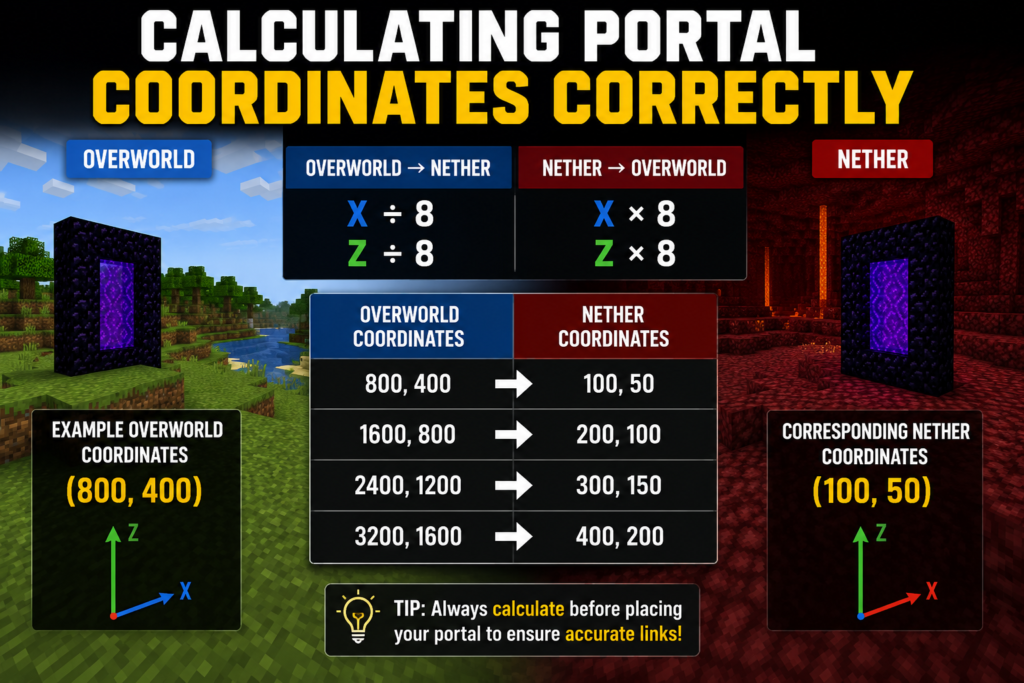
Minecraft uses a simple coordinate conversion system. The X and Z coordinates are divided by eight when traveling from the Overworld to the Nether. When traveling from the Nether back to the Overworld, the coordinates are multiplied by eight.
This system forms the foundation of Nether portal mechanics, dimension coordinate conversion, and coordinate-based portal linking.
Players who understand the distance between Nether portal coordinates can build portals that connect correctly on the first attempt instead of fixing errors later.
The table below shows several common coordinate conversions.
| Overworld Coordinates | Nether Coordinates |
| 800, 400 | 100, 50 |
| 1600, 800 | 200, 100 |
| 2400, 1200 | 300, 150 |
| 3200, 1600 | 400, 200 |
These calculations improve portal alignment distance and help maintain accurate portal connections.
Many experienced players manually build destination portals at the calculated coordinates instead of allowing Minecraft to generate them automatically. This produces more reliable results and reduces future connection problems.
Nether Portal Distance Calculator Examples
Understanding coordinate formulas is useful, but practical examples make the process easier. This section shows how a portal distance calculator works in real situations.
Players often use a Nether portal calculator distance tool because it removes guesswork and provides instant coordinate conversions.
Example 1: Converting Overworld Coordinates
Imagine your main base is located at:
X = 2400
Z = 800
To find the Nether location:
2400 ÷ 8 = 300
800 ÷ 8 = 100
Your destination portal should be placed near:
X = 300
Z = 100
By building the portal at these coordinates, you improve accurate portal placement and reduce the risk of portal overlap.
This method is commonly used for survival Nether portal distance planning because it creates direct routes between major locations.
The example also demonstrates the overworld to Nether distance conversion process.
Example 2: Converting Nether Coordinates
Now imagine a Nether hub portal located at:
X = 500
Z = 250
To determine the Overworld destination:
500 × 8 = 4000
250 × 8 = 2000
The linked Overworld portal should be built near:
X = 4000
Z = 2000
This calculation represents the Nether to Overworld distance conversion process.
Many large transportation systems rely on this method when building efficient network highway distance routes across massive worlds.
Using a nether coordinate distance calculator improves accuracy and helps maintain organized travel networks.
Building Multiple Portals in the Same World
As a Minecraft world grows, players usually need more than one portal. A single portal may work well at the beginning, but additional bases, farms, villages, and resource locations often require separate travel routes.
Building multiple portals successfully requires an understanding of multiple portals and the distance between multiple portals and network distance planning.
The biggest mistake players make is placing new portals without checking existing coordinates. This often creates unexpected connections because Minecraft selects a nearby portal instead of creating a new route.
When adding new portals, it helps to review existing portal locations and compare their converted coordinates.
The table below shows a simple planning structure.
| Portal Type | Suggested Planning Method |
| Main Base | Direct Coordinate Match |
| Farm Portal | Separate Converted Coordinates |
| Village Portal | Dedicated Nether Route |
| Mining Portal | Unique Destination Area |
| Hub Portal | Centralized Network Design |
This approach reduces portal connection problems and creates cleaner transportation routes.
Players who plan portal networks carefully spend less time fixing links and more time exploring.
Multiplayer Considerations for Nether Portal Distance
Many portal guides focus only on single-player worlds. Multiplayer servers create a completely different challenge because dozens or even hundreds of portals may exist within the same world.
This is one area where many competitor articles provide very little information.
On multiplayer servers, Minecraft Nether portal distance becomes much more important because multiple players are building portals independently.
Without planning, portals may overlap, share destinations, or interfere with each other.
A server that begins with five portals may eventually contain hundreds of portals.
Because of this growth, server owners often establish rules for:
| Server Rule | Purpose |
| Coordinate Planning | Prevent Portal Conflicts |
| Hub Connections | Centralized Travel |
| Portal Registration | Organized Expansion |
| Distance Requirements | Reduce Overlap |
| Dedicated Regions | Player Separation |
These systems improve portal travel optimization and help maintain stable travel routes.
Large communities often rely on structured portal networks instead of random placement.
Shared Portals vs Individual Player Portals
One of the biggest decisions on a multiplayer server is whether players should share portals or maintain separate portal systems.
Shared portals are easier to manage and require fewer resources. They also help create centralized transportation networks.
Individual portals offer more flexibility and privacy but require careful coordinated planning.
The comparison below highlights the differences.
| Shared Portals | Individual Portals |
| Easier Management | Greater Flexibility |
| Fewer Resources | More Construction |
| Organized Routes | More Coordinate Planning |
| Better for Small Servers | Better for Large Communities |
The best choice depends on the size of the server and the goals of the player community.
Understanding portal connection distance, portal linking mechanics, and linked portal distance helps server administrators make better decisions when designing travel systems.
Nether Hub Networks Explained
A Nether hub is one of the most effective transportation systems in Minecraft.
Instead of building direct portal connections everywhere, players create a central location inside the Nether and connect multiple destinations to that hub.
This method dramatically reduces travel time.
A hub-based system is especially useful for Minecraft dimension travel distance management because the Nether compresses travel distances by a factor of eight.
A typical hub may connect:
- Main Base
- Villages
- Farms
- Resource Areas
- Trading Halls
- Community Projects
This structure creates a powerful Nether hub portal distance network that remains organized even as the world expands.
Many advanced worlds use hub systems because they scale far better than independent portal connections.
Designing an Efficient Nether Hub
An efficient hub begins with planning.
Many players create a hub after portal problems appear. A better approach is to design the hub before dozens of portals exist.
A well-designed hub supports future growth and minimizes portal conflicts.
The most successful hubs share several characteristics.
| Hub Feature | Benefit |
| Central Location | Easy Navigation |
| Clear Signage | Faster Travel |
| Organized Routes | Fewer Mistakes |
| Coordinate Labels | Accurate Connections |
| Expansion Space | Long-Term Growth |
These principles support a strong network hub spacing guide and improve portal network distance management.
Large hubs often become the center of an entire multiplayer community.
When designed properly, they can support hundreds of portals without creating major linking issues.
Long-Distance Travel Using Nether Hubs
One of the biggest advantages of a Nether hub is fast travel.
A destination that is thousands of blocks away in the Overworld can often be reached by traveling only a few hundred blocks inside the Nether.
This is why Minecraft fast travel distance systems almost always rely on Nether infrastructure.
For example:
| Overworld Distance | Nether Distance |
| 800 Blocks | 100 Blocks |
| 4,000 Blocks | 500 Blocks |
| 8,000 Blocks | 1,000 Blocks |
| 16,000 Blocks | 2,000 Blocks |
This reduction makes exploration much more efficient.
Many players create highways, tunnels, ice roads, and rail systems inside the Nether to improve travel speed even further.
These transportation methods combine perfectly with Nether highway portal spacing, portal travel optimization, and efficient Nether highway distance planning.
For a detailed explanation of linking behavior, destination matching, and portal setup techniques, see this guide: https://calcurax.com/nether-portal-linking/.
Understanding these systems allows players to create reliable travel routes that remain useful throughout the life of a Minecraft world.
Portal Spacing for Large Bases and Cities
As Minecraft worlds become larger, portal planning becomes more important. A small survival base may only need one portal, but large cities, community projects, and interconnected districts often require several travel routes.
This is where Nether portal spacing and portal placement distance play a major role.
Many players build additional portals whenever a new area is developed. While this may work initially, problems often appear when the world grows, and portals begin competing for the same destination.
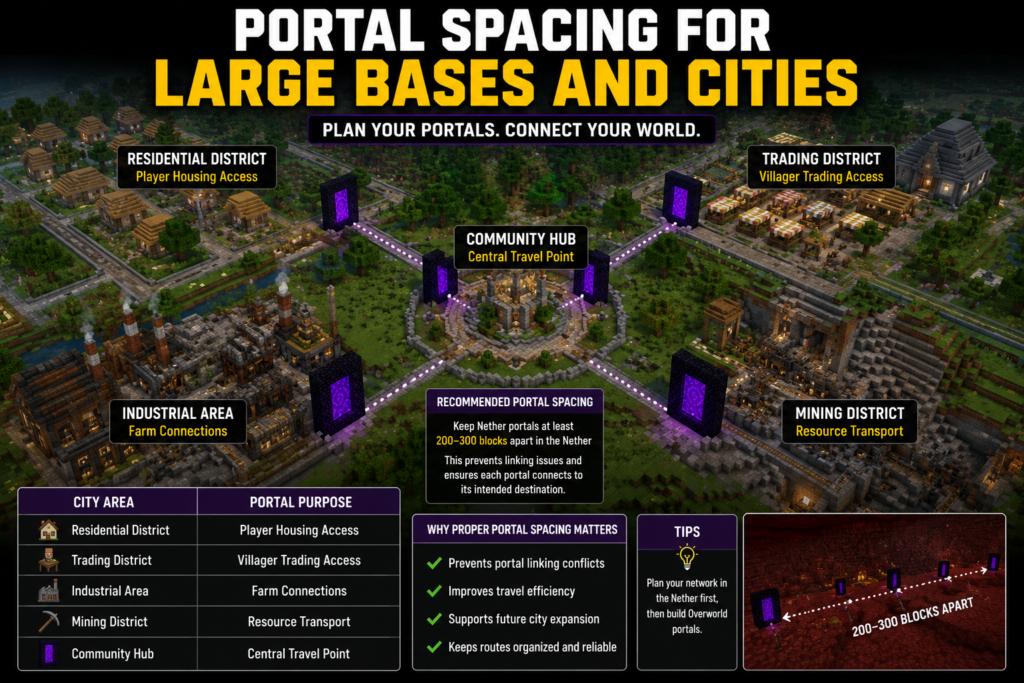
Large cities benefit from organized portal layouts. Instead of placing portals randomly, it helps to create a transportation plan that assigns a specific destination to each district.
For example, a city might include:
| City Area | Portal Purpose |
| Residential District | Player Housing Access |
| Trading District | Villager Trading Access |
| Industrial Area | Farm Connections |
| Mining District | Resource Transport |
| Community Hub | Central Travel Point |
This structure improves portal alignment distance and makes navigation easier for players.
Proper spacing also supports future expansion. When new districts are added, additional portals can be connected without disrupting existing routes.
Players who invest time in planning often experience fewer portal connection problems and spend less time fixing portal links later.
Portal Placement for Farms and Resource Areas
Farms are often located hundreds or thousands of blocks away from a player’s main base. Because of this, efficient portal placement can save a large amount of travel time.
Many advanced farms depend on accurate portal linking.
Examples include:
| Farm Type | Common Portal Usage |
| Gold Farm | Fast Resource Transport |
| Guardian Farm | Quick Access |
| Creeper Farm | Item Collection Routes |
| Iron Farm | Village Connection |
| Slime Farm | Remote Access |
When creating portals for farms, players should calculate destination coordinates before construction.
This practice improves correct portal placement distance and helps maintain stable travel routes.
Resource gathering locations benefit from the same approach.
Ancient debris mining areas, fortress routes, and remote exploration zones can all be connected using carefully planned portals.
Many players use a dedicated transportation network that combines portal network distance, Nether highways, and coordinate-based linking.
This system provides faster access to important locations while reducing unnecessary travel.
Common Nether Portal Distance Mistakes
Many portal problems occur because of simple planning mistakes.
Players often assume that portals automatically connect to the intended destination. Minecraft’s linking system is more complex than that.
One common mistake involves ignoring coordinate conversion.
A portal may appear far away in the Overworld but become extremely close after conversion to Nether coordinates.
Another common issue is activating portals before calculating coordinates.
When this happens, Minecraft may generate portals in unexpected locations. Fixing these mistakes later usually requires additional work.
The table below highlights several common errors.
| Mistake | Result |
| Ignoring Coordinate Conversion | Incorrect Linking |
| Building Too Close Together | Portal Overlap |
| Random Portal Placement | Unpredictable Routes |
| No Hub Planning | Network Confusion |
| Skipping Testing | Hidden Linking Problems |
Understanding Minecraft portal distance rules, portal matching distance, and portal destination distance helps players avoid these issues.
Most portal errors can be prevented with basic planning and coordinated calculations.
Troubleshooting Incorrect Portal Linking
Even well-designed systems occasionally experience linking issues.
The good news is that most problems can be fixed once the source of the error is identified.
The first step is checking coordinates.
If a portal links incorrectly, compare the portal locations in both dimensions and verify that the coordinate conversion was performed correctly.
Many cases of broken portal linking distance occur because a destination portal was built at the wrong coordinates.
Another common issue involves nearby portals.
Minecraft may detect an existing portal and connect to it instead of the intended destination.
The troubleshooting process often includes:
| Troubleshooting Step | Purpose |
| Check Coordinates | Verify Conversion |
| Inspect Nearby Portals | Find Conflicts |
| Compare Destinations | Confirm Alignment |
| Rebuild Incorrect Portal | Restore Accuracy |
| Test Both Directions | Verify Connection |
Understanding fix portal linking distance, portal mismatch distance, and Minecraft portal troubleshooting techniques can solve most linking problems.
When troubleshooting is done methodically, portal systems usually become much easier to manage.
Advanced Portal Placement Strategies
Players who manage large worlds often use advanced placement techniques to create highly organized transportation systems.
These methods go beyond basic coordinate conversion and focus on long-term efficiency.
One strategy involves creating dedicated portal zones.
Instead of placing portals wherever they are needed, players reserve specific coordinate regions for different projects.
Another method involves transportation layering.
A main hub connects major destinations, while secondary portals connect smaller locations.
This creates a scalable system that supports future expansion.
Advanced players also pay close attention to:
| Strategy | Benefit |
| Coordinate Mapping | Better Organization |
| Dedicated Portal Regions | Reduced Conflicts |
| Hub-Based Networks | Easier Expansion |
| Highway Integration | Faster Travel |
| Planned Growth Areas | Long-Term Stability |
These methods improve network portal optimization, support portal travel optimization, and make large transportation systems easier to maintain.
As worlds continue growing, structured planning becomes increasingly valuable.
Nether Portal Distance on Servers vs Single-Player
Portal management differs greatly between single-player worlds and multiplayer servers.
In a single-player world, one person controls all portal locations. This makes planning much simpler.
On a multiplayer server, many players may create portals independently. Without coordination, portal overlap becomes much more likely.
The comparison below highlights the difference.
| Single-Player | Multiplayer |
| Full Control | Shared World |
| Easier Planning | More Coordination |
| Fewer Portals | Many Portals |
| Simpler Troubleshooting | More Complex Networks |
| Lower Conflict Risk | Higher Conflict Risk |
This difference explains whether hub spacing guide strategies are especially useful on multiplayer servers.
Server owners often create community hubs, designate travel, and coordinate planning systems to maintain order.
A structured transportation network supports efficient travel and reduces linking conflicts across the server.
Understanding bedrock portal distance, java portal distance, minecraft bedrock nether portal range, and minecraft java nether portal range is also useful because portal behavior can vary slightly depending on version updates and platform-specific mechanics.
Frequently Asked Questions
How far apart should Nether portals be?
There is no universal answer because portal linking depends on coordinates. Many players use a minimum separation of around 128–256 blocks in the Overworld and 16–32 blocks in the Nether. Larger networks often require coordinate-based planning rather than relying on fixed distances.
What is the ideal Nether portal distance?
The ideal Nether portal distance depends on your goals. Small survival worlds may function perfectly with moderate spacing, while large multiplayer networks usually require carefully calculated portal locations.
Can two portals connect to the same destination?
Yes. This happens when portals are located within the same search area after coordinate conversion. The result is often neither portal overlap nor shared destinations.
What is the Nether portal maximum distance?
Minecraft does not have a practical Nether portal maximum distance for normal travel networks. Portals can connect across extremely large worlds as long as coordinates are calculated correctly.
Why is my portal linking to the wrong place?
Incorrect linking usually happens because of coordinate conversion errors, nearby portals, or portal overlap. Checking converted coordinates is often the fastest solution.
Do Nether hubs improve travel speed?
Yes. Hub systems take advantage of the Minecraft teleportation system and the 1:8 coordinate ratio, allowing players to travel much farther while covering less physical distance.
Are Nether portals different in Java and Bedrock?
The core Nether portal behavior remains similar, but some portal generation and linking details can vary between versions and updates.
Final Thoughts
Understanding Nether portal distance can completely change how players move around a Minecraft world. What begins as a simple portal quickly becomes part of a larger transportation system involving coordinate conversion, destination matching, spacing rules, and portal search mechanics.
Players who understand Minecraft Nether portal distance, portal linking rules, Nether portal spacing, and portal connection distance can create reliable travel routes without dealing with constant linking issues.
Whether you are building a survival base, designing a city, managing a multiplayer server, or creating a large Nether hub, proper planning makes travel faster and more predictable.
By learning the portal linking algorithm, calculating coordinates correctly, and following a structured portal placement guide, you can avoid portal overlap, reduce troubleshooting, and build a transportation network that continues working as your world grows.
The key is simple: calculate first, build second, and always think about how future portals will fit into your network. That approach leads to accurate connections, efficient travel, and a much smoother Minecraft experience.
Thanks for reading this guide on Nether portal distance. If you enjoy online calculators and gaming-related tools, visit Calcurax at https://calcurax.com/ to explore more useful resources and tools.