

Minecraft depends heavily on its coordinate system, and most players struggle when they first deal with Nether portal coordinates. This guide explains how Minecraft coordinates work in simple terms and shows how players can move between the Overworld and Nether without getting lost. Many beginners in the United States get confused when portals send them to the wrong place, and the main reason is not understanding how x-, y-, and z-coordinates in Minecraft actually work.
Before you start building or converting portals, you can use the Nether Portal Calculator tool to instantly handle calculations instead of doing manual math.
In this guide, you will learn how Nether coordinates, Overworld coordinates, and portal coordinates connect, why scaling exists, why Y stays unchanged, and how mistakes happen during conversion. Everything is explained in simple language so any Minecraft player can follow along easily.
What Are Nether Portal Coordinates in Minecraft?
The idea of Nether portal coordinates comes from how Minecraft connects two worlds through its coordinate system. Every location in the game has an X, Y, and Z position, and these values decide where a player exists in both the Overworld and Nether.
In Minecraft coordinate guide systems, the game uses portal linking coordinates to decide where a player should appear after entering a portal. The system checks the Overworld position, converts it into Nether space, and then tries to place or match a portal.
For example, if a player stands at a specific Overworld location, the game converts that position into Nether coordinates so the travel feels faster. This is part of the Minecraft teleportation system, which allows long-distance movement without walking.
Understanding Minecraft Coordinates System (X Y Z Explained)
The x, y, z coordinates of the Minecraft system are the foundation of every movement in the game. The Minecraft world is built on three axes inside the Minecraft coordinate system, and each axis controls a different direction.
X coordinate represents east and west movement. Moving east increases the X value, while moving west decreases it. Z coordinate represents north and south movement, where north reduces Z, and south increases it. Y coordinate represents height, which shows how high or low a player is in the world.
This system is used everywhere, from building structures to understanding Minecraft navigation coordinates. Without it, the game would not be able to track player positions or manage Minecraft dimension travel between the Overworld and the Nether.
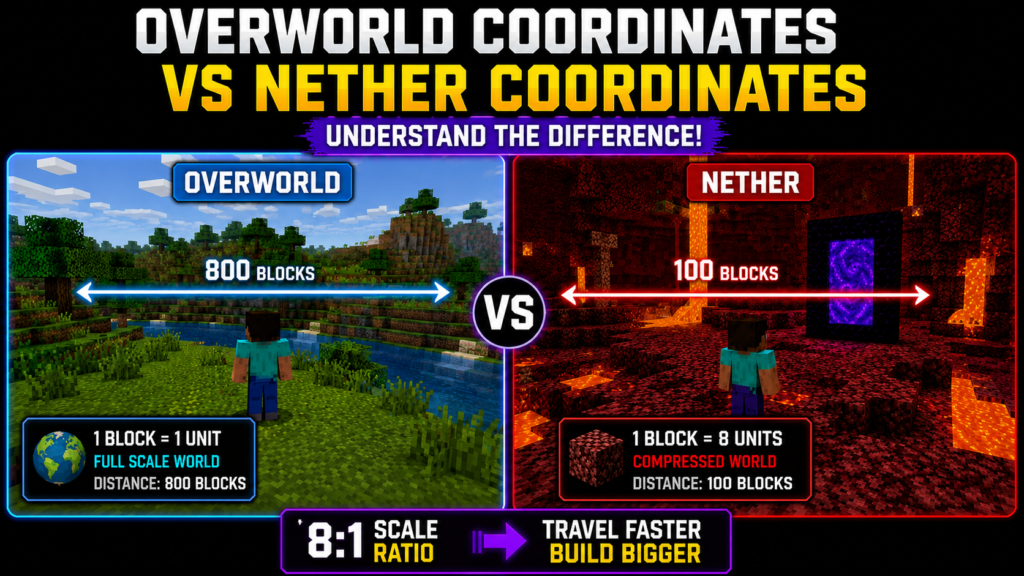
Overworld Coordinates vs Nether Coordinates Difference
The difference between overworld coordinates and Nether coordinates comes from how Minecraft compresses space inside the Nether. The Overworld uses a full-scale world, while the Nether is designed to be smaller in distance but equal in value conversion.
In the Overworld, one block equals one unit. In the Nether, that same distance is compressed. This is part of the Nether travel system, where movement becomes faster because the world scale is reduced.
This difference allows players to travel long distances quickly, making Minecraft coordinate guide systems useful for survival gameplay and large builds.
Why Nether Portal Coordinates Use 8:1 Scaling System
The reason behind coordinate scaling in Minecraft is the 8:1 ratio. This means one block in the Nether equals eight blocks in the Overworld. This system is known as the 8:1 ratio Minecraft mechanic.
The reason Mojang designed this system was to create faster travel without breaking the survival balance. If the scale were equal, neither travel would provide any benefit.
For example, traveling 800 blocks in the Overworld would only require 100 blocks in the Nether. This is why Nether portal coordinates are always calculated using division and multiplication rules.
How to Convert Overworld Coordinates to Nether Coordinates
The process of converting overworld to Nether coordinates is simple when you understand the rule. You take the Overworld X and Z values and divide them by 8. This is called coordinate conversion Minecraft.
Y value stays the same because height does not affect dimension scaling.
Example of nether coordinate conversion:
If a player is at 800 X and 400 Z in the Overworld, the Nether position becomes 100 X and 50 Z.
This system is widely used in portal placement guide strategies and helps prevent errors during building.
How to Convert Nether Coordinates to Overworld Coordinates
The reverse process is known as Nether to Overworld coordinates conversion. In this case, you multiply the Nether X and Z values by 8.
For example, if a player is at 50 X and 25 Z in the Nether, the Overworld position becomes 400 X and 200 Z.
This method is commonly used when building Nether hub coordinate systems that connect multiple bases across large worlds. It is also part of the advanced portal linking system design in Minecraft survival servers.
Why the Y Coordinate Does Not Change in the Nether Portal System
The reason Y stays unchanged in Nether portal coordinates is that vertical height does not affect dimension scaling. The Nether and Overworld have completely different terrain structures, so adjusting height would create unstable portal placement.
The Minecraft coordinate system only scales X and Z because they represent horizontal movement. Y is only used for elevation, not distance conversion.
This is why portal linking coordinates always ignore height and focus only on horizontal positioning.
Understanding Negative Coordinates in Minecraft Worlds
Negative values in negative coordinates in Minecraft simply represent direction. Negative X means west, while negative Z means north.
Many beginners think negative numbers mean wrong locations, but they are just part of the normal Minecraft coordinate guide system.
For example, a player at -200 X is simply 200 blocks west of the center point. This system is important for Minecraft navigation coordinates, especially when building long-distance travel routes.
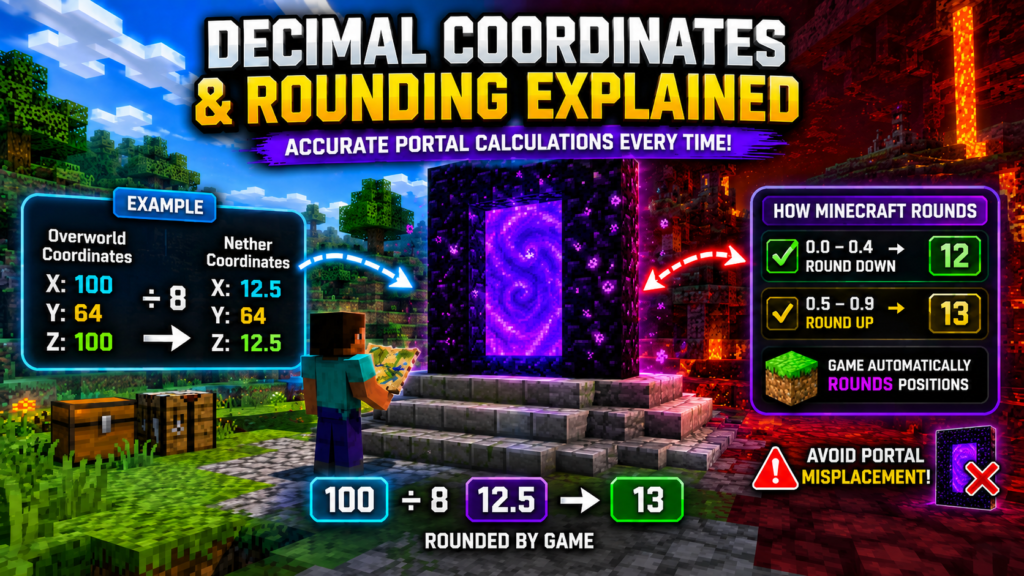
Decimal Coordinates and Rounding Explained
When performing coordinate conversion Minecraft calculations, decimal numbers often appear. For example, dividing 100 by 8 gives 12.5.
These values are part of the decimal coordinates of Minecraft behavior. The game automatically rounds these values when placing portals or calculating positions.
Players who ignore rounding often face coordinate mistakes in Minecraft, which can lead to incorrect portal linking or misplaced exits.
Step-by-Step Nether Portal Linking Mechanism
The portal linking system in Minecraft works by searching for the nearest valid portal when a player enters one. The game checks surrounding areas using converted portal coordinates and chooses the closest match.
If no portal exists, the game creates a new one based on portal linking coordinates.
The system also checks distance ranges inside the Nether travel system, which can sometimes cause portals to link incorrectly if multiple portals are too close.
Common Nether Portal Coordinates Mistakes Players Make
One of the biggest problems in Nether portal coordinates usage is incorrect scaling. Many players forget to divide or multiply by 8, which leads to broken travel routes.
Another common issue is ignoring negative coordinates in Minecraft, which causes portals to appear in unexpected locations. Building portals without checking the coordinate conversion Minecraft rules is another major mistake.
These errors often lead to broken Minecraft teleportation system behavior and confusing travel results.
Advanced Portal Placement Strategy for Perfect Linking
A proper portal placement guide helps players avoid linking issues. The best method is to always calculate coordinates before building and ensure portals are aligned correctly.
Spacing also matters in the Nether hub coordinates system. If portals are too close, the game may link them incorrectly.
Proper planning improves Minecraft dimension travel efficiency and prevents duplicate portal creation.
How Nether Portal Coordinates Help Fast Travel in Minecraft
Using Nether portal coordinates correctly allows players to reduce travel distance by almost 8 times. This makes building bases, farms, and cities much faster to connect.
The Nether travel system is especially useful in survival worlds where long-distance movement is common. Instead of walking thousands of blocks, players can use portals to move quickly between locations.
Use the Nether Portal Calculator for Instant Coordinate Conversion
Manually calculating Nether to Overworld coordinates or Overworld to Nether coordinates can lead to mistakes, especially with decimals or negative values.
A Nether portal coordinate calculator makes this process faster and more accurate. It automatically performs coordinate conversion and Minecraft calculations and reduces human error during portal building.
Real Examples of Nether Portal Coordinate Conversion
In real gameplay, Nether coordinates and Overworld coordinates conversion works like this:
Overworld Example:
800 X, 70 Y, 400 Z becomes 100 X, 70 Y, 50 Z in the Nether.
Nether Example:
50 X, 64 Y, 25 Z becomes 400 X, 64 Y, 200 Z in the Overworld.
These examples show how Minecraft coordinate guide rules apply in real gameplay situations.
Pro Tips for Mastering Nether Portal Coordinates Like a Pro
Players who understand Minecraft Nether coordinates guide systems always plan their portal placement carefully. Always double-check calculations before building.
Marking coordinates helps avoid mistakes in Minecraft navigation coordinates, especially when building large travel networks. Proper planning also improves the portal linking system’s‘s accuracy and prevents unwanted portal creation.
Frequently Asked Questions About Nether Portal Coordinates
What are the Nether portal coordinates in Minecraft?
Nether portal coordinates are the converted X and Z positions that connect the Overworld and Nether. They help Minecraft decide where a player should appear after using a portal based on the Minecraft coordinate system.
Why do Nether coordinates use an 8:1 ratio?
The Nether uses an 8:1 ratio, so travel becomes faster. This means 1 block in the Nether equals 8 blocks in the Overworld, making long-distance movement much quicker in Minecraft dimension travel.
Why does the Y coordinate stay the same in portal conversion?
The Y coordinate stays the same because it only represents height. Minecraft only scales X and Z for travel distance, while Y is used for vertical positioning in both overworld coordinates and Nether coordinates.
What happens if I don’t convert coordinates correctly?
If the coordinates are wrong, your portal may link to a different location. This is one of the most common coordinate mistakes Minecraft players face, and it can cause unexpected teleportation spots.
Can negative coordinates affect Nether portal travel?
Yes, but only in direction, not function. Negative values simply mean west or north in the Minecraft coordinate system, and they still work normally for portal linking.
Why does my Nether portal send me to the wrong place?
This usually happens when there are nearby existing portals or incorrect coordinate conversion Minecraft calculations. The game always tries to link to the closest valid portal location.
Do decimal coordinates matter in Minecraft portals?
Yes, decimal values appear during calculations like Nether coordinate conversion, but Minecraft rounds them internally when placing portals, so players usually work with whole numbers.
What is the best way to calculate portal coordinates?
The easiest way is to divide Overworld X and Z by 8 for Nether travel or multiply Nether values by 8 for the Overworld. Many players also use a Nether portal coordinate calculator to avoid errors.
Why do some portals link incorrectly even with correct coordinates?
This happens because Minecraft checks nearby portals first. If another portal is closer than your calculated position, it may override the expected portal linking coordinates.
How can I avoid Nether Portal mistakes in survival mode?
Always double-check your calculations, mark coordinates before building, and keep portals spaced properly. This helps prevent Minecraft navigation coordinates errors and improves travel accuracy.
“For more tools like trading value checks and in-game calculations, visit our Blox Fruits Calculator on the homepage.